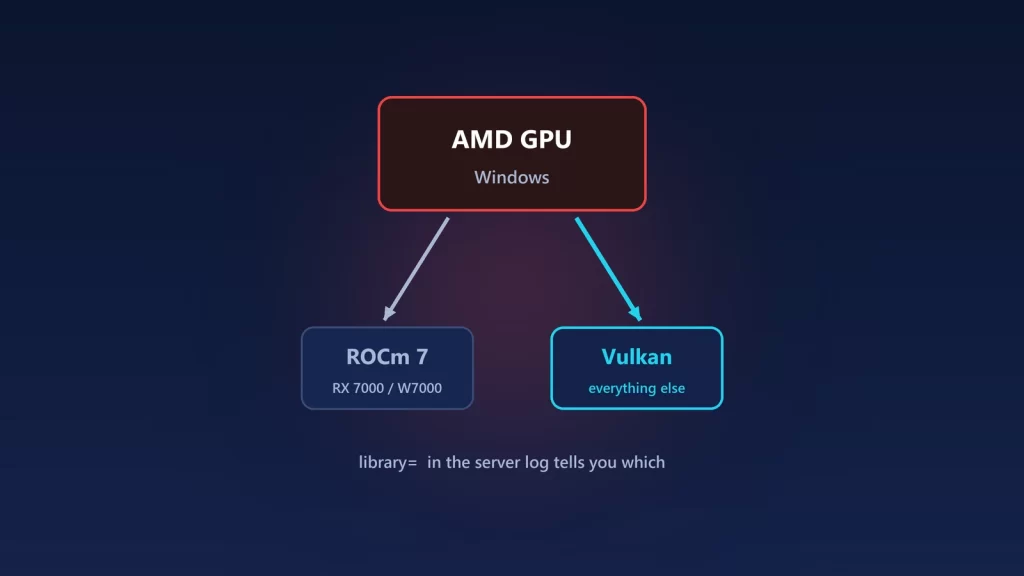
On Windows, Ollama uses AMD’s ROCm library only for a short list of Radeon cards: the RX 7000 series and Radeon PRO W7000 cards, with a ROCm 7 driver stack. Every other AMD GPU runs through Vulkan instead, including RX 6000 cards, the newer RX 9000 series and Ryzen AI integrated graphics. Vulkan is now on by default and needs no setup on Windows. That’s why many older guides no longer apply: they tell you to turn Vulkan on, or to use a ROCm override that only works on Linux. If your AMD GPU isn’t being used, update the AMD driver, then check Ollama’s server log to see which library it picked. Here’s how.
Which AMD GPUs use ROCm on Windows
Ollama’s GPU documentation lists the cards it supports through ROCm on Windows. It also says the Windows build needs “an AMD ROCm v7 / HIP7-capable driver stack.” Since version 0.18.0, released March 14, 2026, Ollama ships with ROCm 7 and requires the latest AMD drivers “for continued support.”
| Your AMD GPU | What Ollama uses on Windows |
|---|---|
| Radeon RX 7900 XTX, 7900 XT, 7900 GRE, 7800 XT, 7700 XT, 7600 XT, 7600 | ROCm, with a current driver |
| Radeon PRO W7900, W7800, W7700, W7600, W7500 | ROCm, with a current driver |
| Radeon RX 6000 series | Vulkan. Ollama’s Windows page warns that some RDNA2 cards, RX 6800-class included, “may not expose ROCm v7” on current Windows drivers. |
| Radeon RX 9000 series, Ryzen AI integrated graphics | Vulkan. ROCm supports these only on Linux in Ollama’s list. |
| Older Radeon cards | Vulkan, if the driver supports it |
Vulkan isn’t a hack. The docs describe it as “additional GPU support” on Windows and Linux, enabled by default, and say most Windows GPU drivers include Vulkan support “and require no additional setup steps.”
Advice you can skip
- “Set
OLLAMA_VULKAN=1to enable Vulkan.” Vulkan support started as an experiment in Ollama 0.12.6, in October 2025, and guides from that period say it’s off by default or needs a special build. Ollama’s current docs say it’s on by default, and they only mentionOLLAMA_VULKAN=0, to turn it off. HSA_OVERRIDE_GFX_VERSION. This trick makes ROCm treat an unsupported card as a similar supported one. Ollama documents it under “Overrides on Linux.” It’s not a Windows fix.- Installing the full ROCm SDK on Windows. Ollama’s requirement is the driver stack, not a developer toolkit. The Windows requirements ask for a ROCm 7 / HIP 7-capable driver for ROCm, “or a Vulkan-capable AMD Radeon driver for Vulkan acceleration.”
Check which library Ollama picked
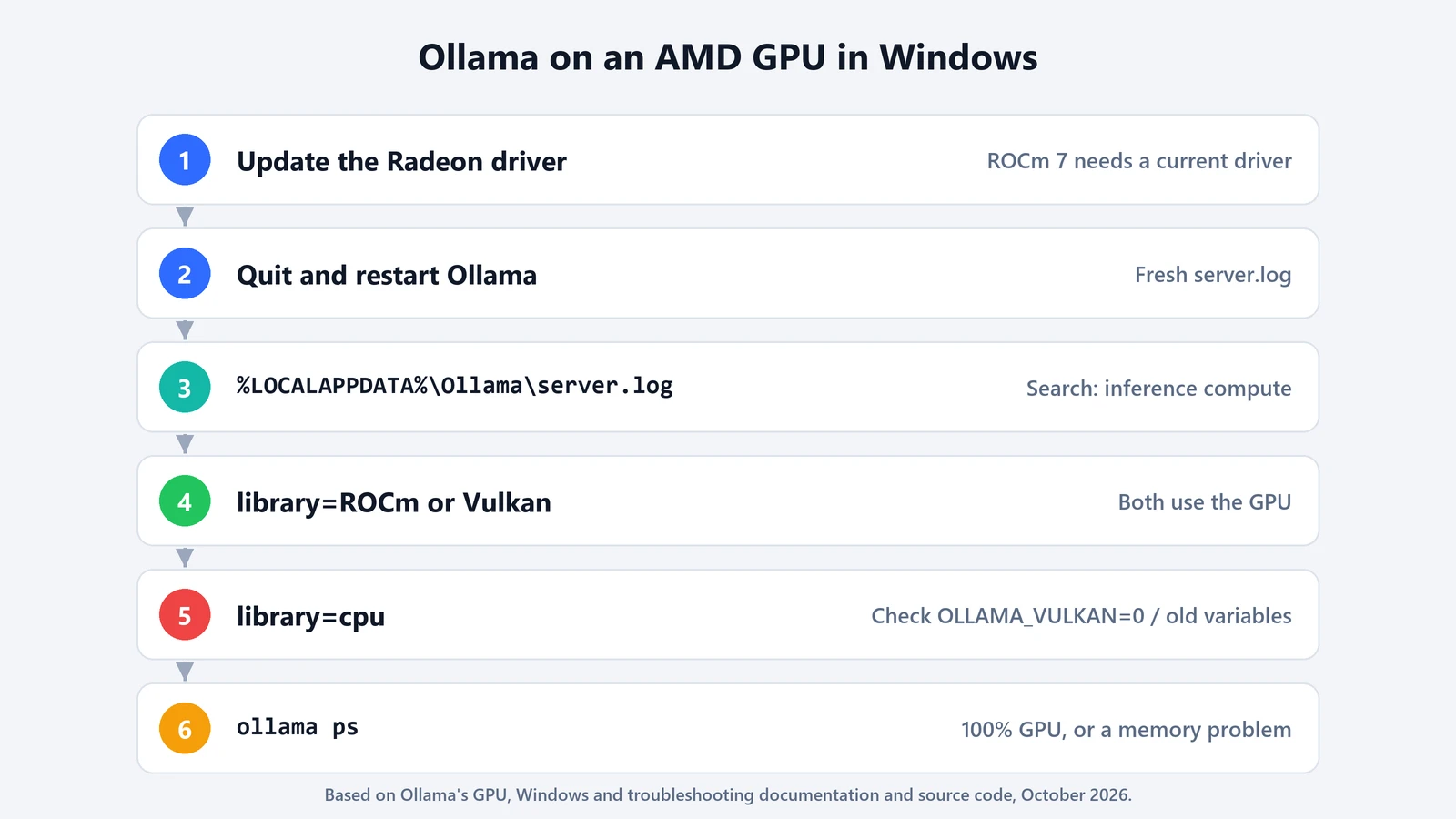
When the Ollama server starts, it writes one inference compute line per GPU it found. According to Ollama’s source code, each line includes the library, the GPU’s name, its type (discrete or iGPU), its total and available memory and the driver. If no GPU was usable, you’ll see a single line with library=cpu.
- Quit Ollama from the system tray and start it again, so you get a fresh log.
- Open the logs, as Ollama’s troubleshooting page describes. Press Win+R and run:
explorer %LOCALAPPDATA%\OllamaThe newest log is
server.log. - Search the log for
inference computeand read thelibraryandnamefields. - Load a model and run
ollama ps. ThePROCESSORcolumn should say 100% GPU. A CPU/GPU split means the model didn’t fit in the GPU’s memory, which is a different problem from the GPU not being detected.
Fix the common cases
An RX 7000 card shows up as Vulkan or CPU
The likeliest cause is an AMD driver too old for ROCm 7. Update the Radeon driver from AMD, restart, and check the log again. If it says Vulkan, the GPU is still accelerated, just through a different library.
Nothing AMD shows up at all
Update the AMD driver and make sure you’re on Windows 10 22H2 or newer, Ollama’s minimum. Then check whether OLLAMA_VULKAN=0 or GGML_VK_VISIBLE_DEVICES=-1 is set in your Windows environment variables. Both turn Vulkan GPUs off, and they may be left over from an old guide.
A laptop with both a Radeon iGPU and a discrete GPU
Ollama’s docs say that if a mixed system picks an unstable Vulkan iGPU, you should keep Vulkan on and limit it to the discrete card with GGML_VK_VISIBLE_DEVICES. For example, set it to 1 when the discrete card is Vulkan1 in the log. Set it as a user environment variable, then quit Ollama from the tray and start it again. Ollama’s v0.30.11 release also fixed a bug that swapped the iGPU and discrete GPU labels on Windows hybrid graphics, so update Ollama first if the log shows them the wrong way round.
The GPU is detected but the model runs partly on the CPU
That’s memory, not drivers. A smaller quantization, a smaller model or a shorter context will fit. Our guide to Ollama context length shows how much memory context takes, and what fits in 16 GB covers the model side.
If you’re weighing other tools for an AMD machine, our comparison of Ollama, LM Studio and llama.cpp explains how much control each one gives you.