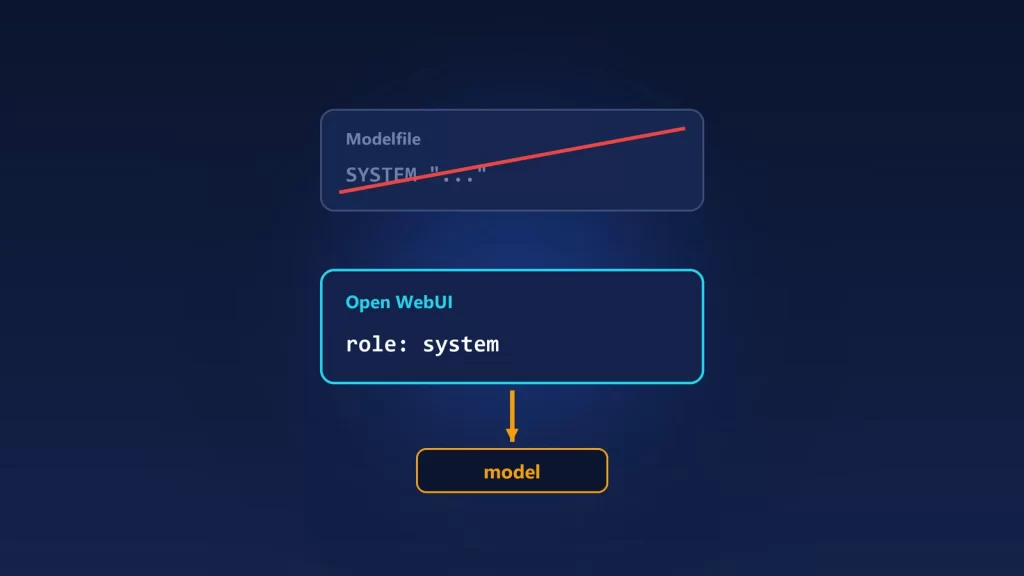
If a model follows its Modelfile’s SYSTEM prompt in ollama run but ignores it in Open WebUI, nothing is broken. Ollama only uses a model’s built-in system prompt when a request arrives without one. Open WebUI often sends one: from the model’s settings in Workspace > Models, from your account settings, from the chat’s controls, or added by features such as MCP servers, skills, voice mode or the code interpreter. The moment any of those exists, Ollama drops the Modelfile prompt completely. The fix is to put the prompt where Open WebUI will always send it. Here’s which prompt wins, and how to check.
Why it works in the terminal and not in the browser
Ollama’s chat code has one rule. If the first message in a request isn’t a system message and the model has a SYSTEM prompt, Ollama adds it at the top. If the request already starts with a system message, the model’s own prompt isn’t added. You can see this in Ollama’s server code, and Open WebUI’s Ollama guide says the same thing in plain words: a system prompt set in the model “is a fallback,” used “only when a chat sends none.”
ollama run usually sends no system message, so the Modelfile prompt applies. Open WebUI builds its own request, and many of its layers add a system message. There’s no merge between Open WebUI’s prompt and the Modelfile’s. One replaces the other.
One part of the Modelfile does survive: MESSAGE lines, the example conversation some Modelfiles include, are added to every request either way.
Which prompt reaches the model
We traced this through Open WebUI’s chat middleware and its Ollama router, as of October 2026, alongside the chat parameters documentation:
| Prompt source | Replaces the Modelfile SYSTEM? | Scope | Where to change it |
|---|---|---|---|
Modelfile SYSTEM |
It’s the fallback | Every client that sends no system message | ollama create with an edited Modelfile |
| Model prompt in Open WebUI | Yes | Every chat with that model | Workspace > Models > edit > System Prompt |
| Account prompt | Yes | All your chats | Settings > General > System Prompt |
| Chat prompt | Yes | That chat only, in place of the account prompt | Chat Controls > System Prompt |
| Folder or project prompt | Yes | Chats in that folder | The folder’s settings |
| Features that inject instructions | Yes, even if you never wrote a prompt | Chats using the feature | Turn the feature off for the test |
Inside Open WebUI, prompts are combined rather than replaced. If a model has a prompt in Workspace > Models and you also have an account or chat prompt, the code puts the model’s prompt first and yours after it, in one system message. The docs describe it from the user’s side: users “cannot override” a system prompt an admin set on the model. Whatever the combination, the Modelfile’s prompt is gone as soon as any of it exists.
The last row is the one that catches people. In the current middleware, these features add their own text to the system message:
- instructions sent by connected MCP servers;
- skills;
- voice mode’s prompt template;
- the browser-based code interpreter;
- attached knowledge, in some modes;
- retrieved documents, if an admin set RAG_SYSTEM_CONTEXT to put them in the system message instead of your message.
So a model can follow its Modelfile prompt for weeks, then “forget” it the day you connect an MCP server.
Find the layer that’s responsible
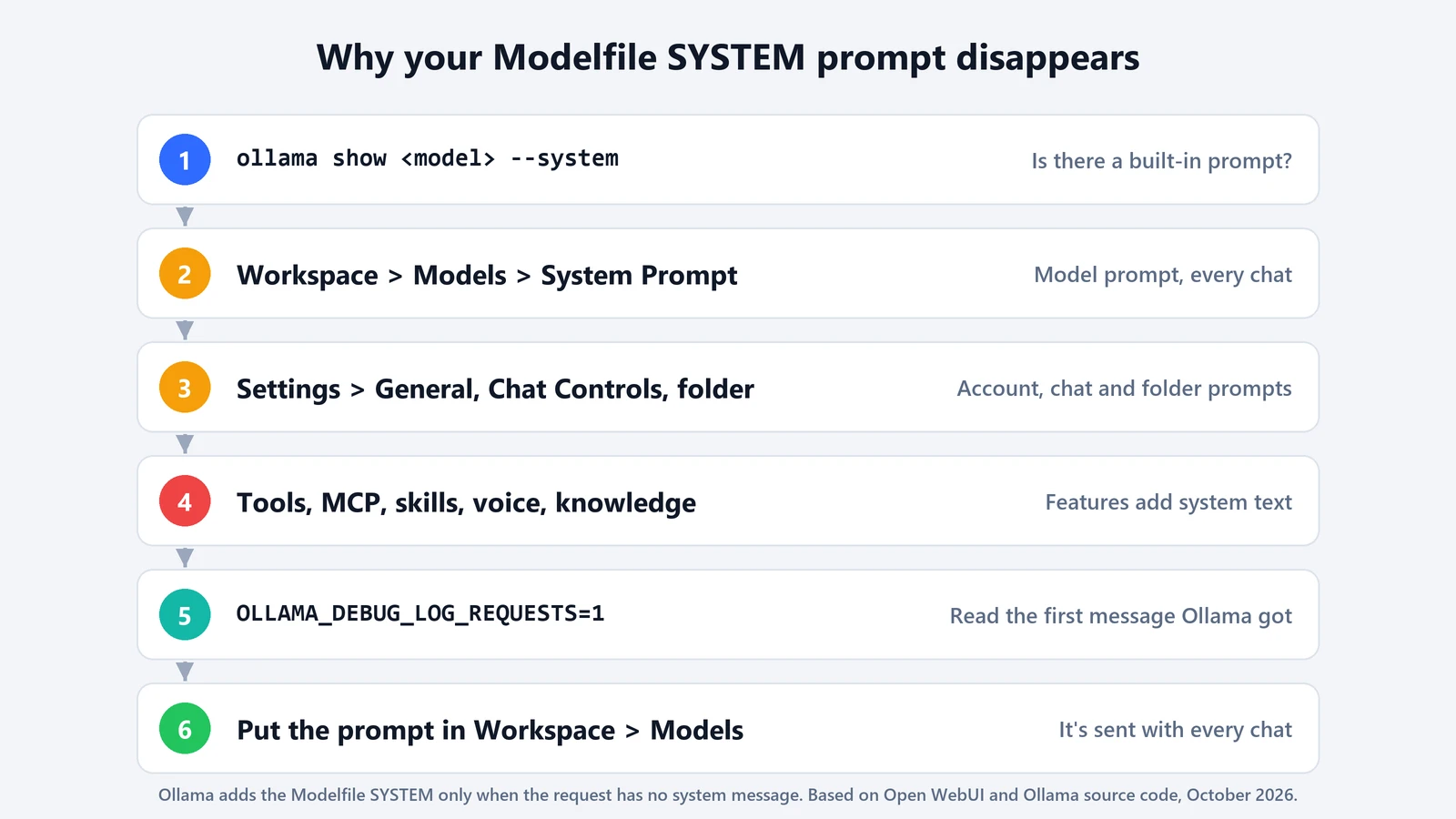
- Confirm the Modelfile prompt exists. Run
ollama showwith the model name and--system. If it prints nothing, there’s no built-in prompt to lose. If you edited the Modelfile, check that you rebuilt the model withollama createand that Open WebUI is pointing at the rebuilt name. - Check the model in Open WebUI. Open Workspace > Models and edit the model. A model you created there points at an Ollama base model, and its System Prompt field applies to every chat with it.
- Check your account and the chat. Look in Settings > General, then Chat Controls in the open chat. Even a single line there replaces the Modelfile prompt. Also check the folder, if the chat lives in one.
- Turn off the extras. In a new chat, disable tools, MCP servers, skills, voice and the code interpreter, and detach knowledge. If the Modelfile behavior comes back, one of them was adding a system message.
- Look at the request itself. If you still can’t tell, Ollama can record what it receives. Since March 2026, starting the server with
OLLAMA_DEBUG_LOG_REQUESTS=1makes it save each inference request body to a temporary folder, which its code names in the startup log. Open the latest one and read the first message. If it’s a system message, that’s what the model saw. These files contain your full prompts, so turn the setting off and delete them afterwards.
The fix: put the prompt where Open WebUI sends it
The Open WebUI docs give the direct answer: to give a model a system prompt that always applies in Open WebUI, set it in Workspace > Models. Copy the text from ollama show --system into the model’s System Prompt field there. Features that add their own instructions then add them alongside your prompt instead of leaving the model with none.
Keep the Modelfile prompt too if you use the same model from other clients, such as scripts, editors or ollama run. Just know that you now have two copies to keep in sync. If you use a personal account prompt to set tone across all models, as the docs suggest, remember it also wipes out every Modelfile prompt. Put model-specific rules on the model, not on the account.
If the prompt is in place and the model still drifts in long chats, the prompt may not be the problem. Ollama keeps the system message when it trims a long conversation, but a context that’s too small leaves little room for anything else. Our guide to Open WebUI’s num_ctx setting covers that half of the puzzle, and the Ollama context length guide explains the defaults behind it.