Ollama’s default context length isn’t a flat 4,096 tokens anymore. Since version 0.15.5, released February 3, 2026, it depends on your graphics memory: 4,096 tokens below 24 GiB of VRAM, 32,768 from 24 to 48 GiB, and 262,144 at 48 GiB or more. It never goes above the model’s own maximum. To change it, set OLLAMA_CONTEXT_LENGTH for the whole server, or num_ctx for one model or one request. Before you raise it, know the cost: on a model like Llama 3.1 8B, every 1,000 tokens of context takes about 125 MiB of extra memory at Ollama’s default cache precision. Below are the rules, the commands, and a memory table for six popular models.
Why you may have read “4,096”
A lot of guides still say the default is 4,096 tokens, and so does Ollama’s own FAQ at the time of writing. The newer context length page in the same docs has the VRAM tiers, and so do the v0.15.5 release notes. The macOS and Windows apps followed in v0.17.0. So if your GPU has less than 24 GiB, 4,096 is still what you get, which is why the old figure keeps looking right to so many people.
Ollama’s server code adds three details the docs leave out:
- VRAM is totaled across all GPUs, minus any
OLLAMA_GPU_OVERHEADyou’ve reserved. Two 16 GB cards count as 32 GB, so you get the 32,768 tier. - The thresholds are slightly lower than advertised, 23 and 47 GiB, so cards sold as 24 or 48 GB land in the higher tier even if they report a bit less.
- The model’s trained maximum is a ceiling. If the tier says 262,144 but the model was built for 40,960 tokens, you get 40,960. Ollama’s scheduler caps it.
One more behavior from the current source: if you didn’t choose a context length and the model fails to load for lack of memory, Ollama retries once with a smaller automatic value, dropping to 32,768 or 4,096. If you set the number yourself, it doesn’t do that.
Check what you’re actually getting
Load a model and run:
ollama psThe CONTEXT column shows the context the model was loaded with, and PROCESSOR shows where it’s running. Ollama’s docs recommend staying at 100% GPU. If you see a split like 48%/52% CPU/GPU, the model plus its context didn’t fit in VRAM, and part of it is running on the much slower CPU.
To see a model’s maximum context, run ollama show followed by the model name and look for context length.
How to change the context length
| Where | How | Applies to |
|---|---|---|
| Server default | OLLAMA_CONTEXT_LENGTH=32768 ollama serve |
Every model, unless something more specific overrides it |
| Ollama app (macOS, Windows) | Context length slider in Settings | The app’s server |
| Modelfile | PARAMETER num_ctx 32768 |
Every run of the model you build from it |
| Interactive session | /set parameter num_ctx 32768 inside ollama run |
That session |
| API request | "options": { "num_ctx": 32768 } |
That request |
The more specific setting wins: Ollama’s code starts from the server default, then applies the model’s Modelfile parameters, then the request’s options. That explains a common surprise. You raise OLLAMA_CONTEXT_LENGTH and nothing changes, because the model you’re running has a num_ctx in its Modelfile, or because your client sends its own num_ctx with every request. If that client is Open WebUI, here’s how to find which of its settings is sending it.
Where you set the variable depends on how Ollama runs. On macOS and Windows, the app’s slider is the easy route. If you prefer the variable, the FAQ says to use launchctl setenv OLLAMA_CONTEXT_LENGTH 32768 on a Mac, or to quit Ollama on Windows, add it under Edit environment variables for your account, and start Ollama again from the Start menu. Either way, restart the app afterward.
On Linux, where Ollama usually runs as a systemd service, exporting the variable in your shell does nothing for the service. The FAQ’s method is to run sudo systemctl edit ollama.service, add the line below under [Service], then reload and restart:
[Service]
Environment="OLLAMA_CONTEXT_LENGTH=32768"
sudo systemctl daemon-reload
sudo systemctl restart ollamaHow much memory context costs
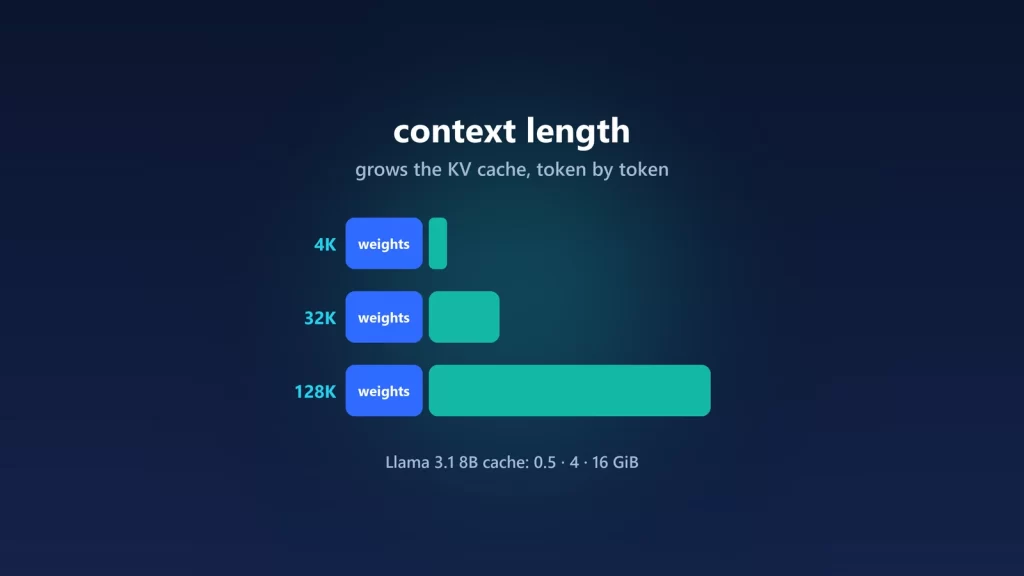
Context lives in the KV cache, the memory where the model keeps the keys and values it has computed for every token so far. Its size grows in a straight line with the context length, and it depends on the model’s shape, not just its parameter count:
KV bytes per token = 2 × layers × KV heads × head size × bytes per valueThe 2 counts keys and values. Ollama’s default cache type is f16, 2 bytes per value. We took the layer counts, KV head counts and head sizes from each model’s published configuration on Hugging Face and did the math. These are our calculations, not measurements. Treat them as the extra memory on top of the model weights, and expect Ollama to reserve a bit more for working buffers.
| Model | Per token | 4,096 | 32,768 | At model max |
|---|---|---|---|---|
| Qwen2.5-Coder 7B | 56 KiB | 0.22 GiB | 1.75 GiB | 1.75 GiB (32,768) |
| Llama 3.1 8B | 128 KiB | 0.5 GiB | 4 GiB | 16 GiB (131,072) |
| Qwen3 8B | 144 KiB | 0.56 GiB | 4.5 GiB | 5.63 GiB (40,960) |
| Qwen3 14B | 160 KiB | 0.63 GiB | 5 GiB | 6.25 GiB (40,960) |
| Mistral Nemo 12B | 160 KiB | 0.63 GiB | 5 GiB | 20 GiB (131,072) |
| Qwen3 32B | 256 KiB | 1 GiB | 8 GiB | 10 GiB (40,960) |
Sources for the model shapes: Qwen2.5-Coder 7B, Llama 3.1 8B (a public mirror of Meta’s gated configuration), Qwen3 8B, Qwen3 14B, Mistral Nemo and Qwen3 32B.
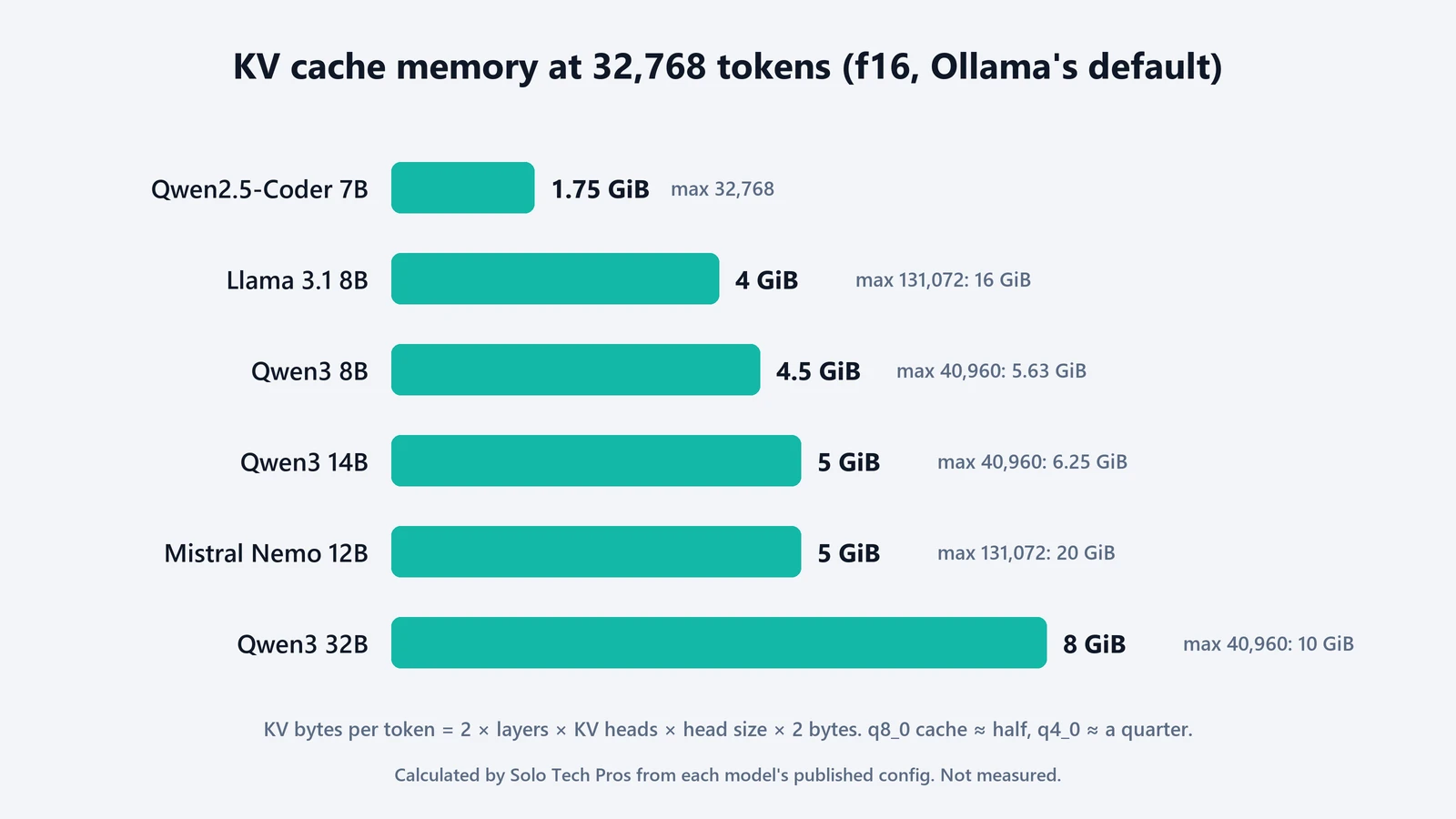
Three things stand out. Size isn’t the whole story: Qwen2.5-Coder 7B needs less than half the cache of Llama 3.1 8B, because it has 4 KV heads instead of 8. Long context on a small model can outweigh the model itself: Llama 3.1 8B at 131,072 tokens needs 16 GiB for the cache alone, about three times the 4.9 GB download of the default llama3.1:8b. And the defaults line up with this. A 16 GB card running an 8B model has room for 4,096 tokens without thinking about it, while 32,768 starts to compete with the weights.
Not every architecture follows this formula. Models that limit some layers to a short window of recent tokens need less. Gemma 3, for example, mixes many of these “local” layers with a few global ones, a design its technical report says was chosen to cut KV cache memory. For models like that, the formula overestimates.
Three ways to fit more context
- Quantize the cache. Set
OLLAMA_KV_CACHE_TYPE=q8_0on the server. Ollama’s FAQ says it uses about half the memory off16with “a very small loss in precision.”q4_0uses about a quarter, with a loss that may show more at long contexts. It needs Flash Attention, which Ollama turns on automatically where the hardware supports it, and it applies to every model on that server. The FAQ warns that models with a high GQA count, such as Qwen2, may lose more precision when the cache is quantized. - Watch parallel requests. Each parallel slot gets its own context. The FAQ’s example: a 2K context with 4 parallel requests becomes an 8K context’s worth of memory. If
OLLAMA_NUM_PARALLELis above 1, multiply the table. - Pick a model with a lighter cache. For long documents or agent work, the KV head count matters as much as the parameter count.
What to set for your use
For short chats, 4,096 to 8,192 tokens is enough, and the default is fine. For long documents, retrieval or anything that pastes files in, go for 16,384 to 32,768 and check ollama ps still says 100% GPU. For coding agents and tools that search the web, Ollama’s own recommendation is at least 64,000 tokens. That’s where cache quantization and a careful choice of model start to matter on consumer GPUs.
Too small a context shows up in two ways. Since v0.30.9, Ollama returns an error if a single message is larger than the context window. A long conversation is different, and quieter. Ollama’s chat code drops the oldest messages until the rest fits, always keeping the system prompt and your latest message, and it only logs that at debug level. So if a model “forgets” something you told it twenty messages ago, the context is the first thing to check. Instructions that must stick belong in the system prompt.
If you’re still choosing hardware, our guides to what runs on 16 GB of RAM and 64 GB vs 128 GB for local AI look at the weights side of the same budget. And if you haven’t settled on Ollama yet, here’s how it compares with LM Studio and llama.cpp.