Chrome’s Prompt API lets a website’s JavaScript send prompts to Gemini Nano, a language model that Chrome downloads and runs on your own computer, instead of sending them to a cloud AI service. It has shipped in desktop Chrome since version 148. But it only works on machines that meet Google’s requirements: Windows, macOS, Linux or Chromebook Plus, at least 22 GB of free disk space, and either a GPU with more than 4 GB of video memory or a CPU setup with 16 GB of RAM and four cores. It doesn’t work in Chrome on Android or iOS. And it’s a Chrome API, not a web standard that Firefox or Safari plan to follow. For developers, it’s a new kind of AI backend: free per request, private by default, but available only to some of your visitors.
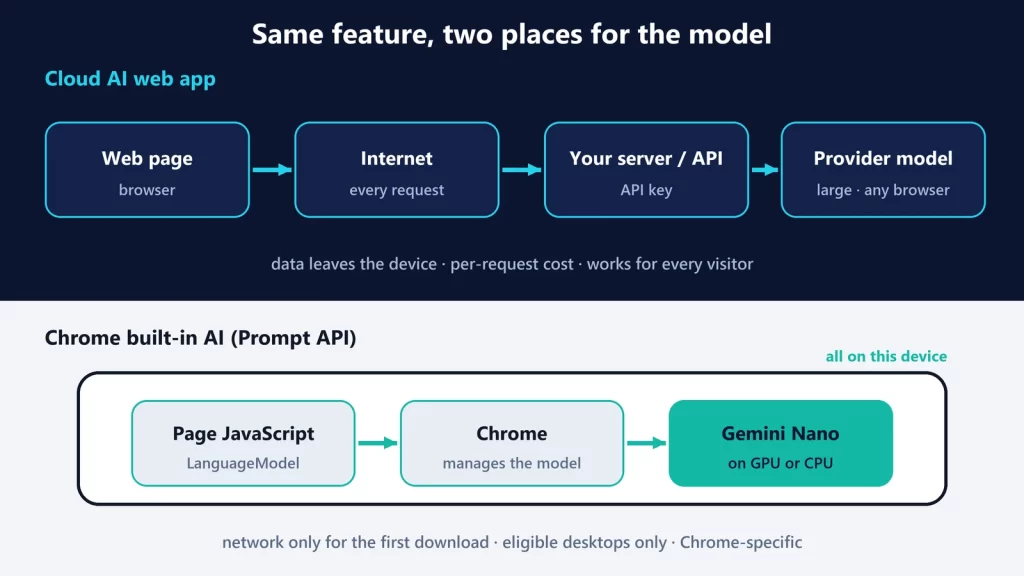
Two ways a web page can use AI
| Cloud AI web app | Chrome built-in AI (Prompt API) | |
|---|---|---|
| Request path | Page → your server or the provider’s API → the provider’s model | Page JavaScript → LanguageModel in Chrome → Gemini Nano on the device |
| Network | Needed for every request | Only for the first model download |
| API key | Yes, and you have to keep it off the client | None |
| Where user data goes | To the AI provider, under its terms | Stays on the device for inference. Your page still sees the input and output. |
| Cost | Per token or per request, paid by you | No per-request fee; the user’s disk, memory and battery pay instead |
| Model choice | Any model the provider offers | Whatever Chrome ships; you can’t pick the version |
| Hardware dependency | None on the user’s side | Strong: unsupported devices get no model |
| Browser dependency | Works in any browser | Chrome desktop; Edge has a developer preview with a different model |
| Latency | Network round trip plus server load | No network round trip; speed depends on the device |
Neither one wins everywhere. The cloud gives you a bigger model and every visitor. The built-in model gives you no per-request cost and no data leaving the device, for the visitors whose hardware qualifies.
Who has the model, and who doesn’t
Chrome includes the API, but not the model. According to Google’s Prompt API documentation, the model is downloaded separately and only on machines that meet these conditions:
- Operating system: Windows 10 or 11, macOS 13 or later, Linux, or ChromeOS on Chromebook Plus devices. Chrome for Android and iOS, and other Chromebooks, “are not yet supported.”
- Storage: at least 22 GB free on the drive with your Chrome profile. The model itself is “significantly smaller,” but if free space drops below 10 GB after the download, Chrome deletes the model.
- GPU or CPU: a GPU with “strictly more than 4 GB of VRAM,” or 16 GB of RAM and at least 4 CPU cores. Audio input requires a GPU.
- Network: an unmetered connection for the download.
Google’s model management guide adds that Chrome tests the GPU with a representative shader and then downloads either a larger Gemini Nano variant (“such as 4B parameters”) or a smaller one (“such as 2B”). So two qualifying users can end up with different models. Updates replace the whole model, not just the changes. Chrome can also delete the model if disk space runs low, if an enterprise policy disables it, or if the user hasn’t met the eligibility criteria for 30 days, “even mid-session.”
That’s why “every Chrome user has Gemini Nano” is wrong. Plenty of laptops have neither a GPU with more than 4 GB of video memory nor 16 GB of RAM. The 16 GB threshold for CPU-only machines is the same line we drew in what AI you can run with 16 GB of RAM.
Does each website download its own copy?
Not in Chrome, as far as Google’s documentation goes. Its model management guide says the download is triggered by the first create() call from “any built-in AI API” that depends on Gemini Nano, which makes it one download for the browser that sites then share. The Prompt API page words it more loosely (“the first time an origin uses the API”), but describes the same separate, browser-managed download. The underlying specification allows browsers to download per site instead, to limit fingerprinting, but notes that costs users time, bandwidth and disk space. To keep sites from probing what’s installed, starting a download requires a user action such as a click.
What it looks like in code
The flow has three steps, and the first one is the one that matters:
- Check availability.
LanguageModel.availability()returns"unavailable","downloadable","downloading"or"available". Pass the same options you’ll use later, such as input types and languages, because some model features may not support them. - Create a session.
LanguageModel.create(), called after a user action, starts the download if needed and reports progress throughdownloadprogressevents. - Prompt it.
session.prompt()orpromptStreaming(), with optional system prompts, image and audio input, and a JSON Schema to force structured output.
Plan for the "unavailable" branch from day one. For many of your visitors, that’s the answer you’ll get. It needs a fallback: a cloud API, a simpler feature, or none at all.
What stays local, and what doesn’t
Google states that after the download, “subsequent use of the model does not require a network connection. No data is sent to Google or any third party when using the model.” That’s a real difference from a cloud API. It’s not a blanket privacy guarantee, for three reasons:
- The website still sees everything. The prompt and the answer pass through the page’s own JavaScript, which can send them anywhere it likes. Local inference changes where the model runs, not what the site does with your data.
- The API doesn’t promise “on-device.” The Prompt API’s explainer says it would be conforming for a browser to implement it “entirely by using cloud services.” Letting developers know or require on-device processing is listed as a goal the authors aren’t yet sure of. Chrome’s implementation runs locally; the API shape alone doesn’t guarantee that.
- Availability can leak information. The specification counts the model’s download status as a possible fingerprinting signal, and describes mitigations such as requiring a user action before a download.
Limits that remain
- Small model. Gemini Nano is built to fit on a laptop, and the explainer says plainly that it doesn’t guarantee model “quality, stability, or interoperability between browsers.”
- Few output languages and modes. Output is text only. Google lists English, Japanese, Spanish, German and French as accepted languages, with more in development.
- Limited tuning on the web. Temperature and top-K aren’t exposed to web pages by default. An origin trial offers preset sampling modes instead.
- Context windows fill up. When a session runs out of room, Chrome drops the oldest exchanges, though never the system prompt. If it still can’t fit the prompt, the call fails.
- Top-level pages only, by default. Cross-origin iframes need explicit permission (
allow="language-model"), and the API isn’t available in Web Workers. - Chrome only, in practice. On Chrome Status, Mozilla’s position is “Negative” and WebKit’s is “Oppose.” Microsoft Edge has the same API as a developer preview in its Canary and Dev channels, but runs it on its own model (Phi-4-mini, with a prerelease Aion-1.0-Instruct option), so the same prompt can behave differently in each browser.
- It costs the user something. The model takes disk space, and inference uses the user’s GPU or CPU, memory and, on a laptop, battery. Which processor does that work is the question we covered in NPU vs GPU vs CPU for local AI.
Where it fits
The Prompt API makes sense for features that improve a page without being essential: classifying or filtering content, drafting short text, extracting fields from what the user pasted, describing an image they’re about to upload. It’s a poor fit for a core feature that every visitor must get, or a task that needs a large model. It’s also different from WebMCP, where the website exposes tools to an agent working in the browser. In the Prompt API, the website itself calls a model that the browser provides.
Chrome documentation, Chrome Status and the Prompt API explainer checked on October 9, 2026.