Browser agents struggle with websites because websites are built for people. An agent has to look at the page, work out which field is which and guess what each button does, one step at a time. WebMCP, a proposed web API that Chrome is testing, lets the site skip the guessing: it can declare actions such as “create a support request” with typed parameters, and an agent in the browser calls that action directly. It shares a name and a philosophy with the Model Context Protocol, but it isn’t MCP running in a browser. It lives in the page, it only exists while the tab is open, and it isn’t a finished standard yet.
Why agents fumble ordinary web pages
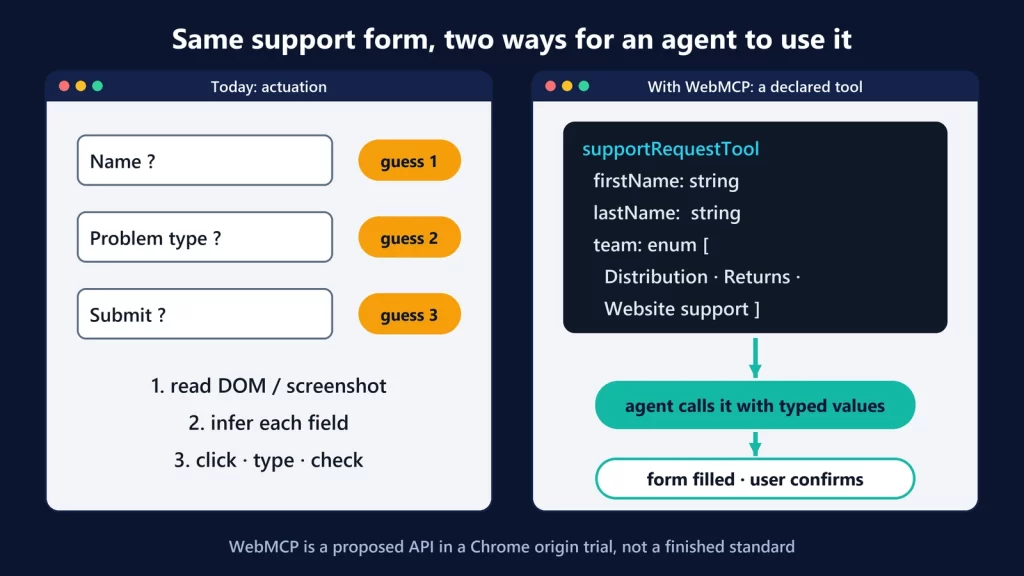
Chrome’s documentation calls the way agents use sites today actuation: “simulating manual mouse clicks and text input, as though it were the human user engaging with your website.” The agent reads the page structure or a screenshot, decides what to do, acts, and checks the result. Google’s point is that this “may have numerous steps and leaves each step open to interpretation by the agent.”
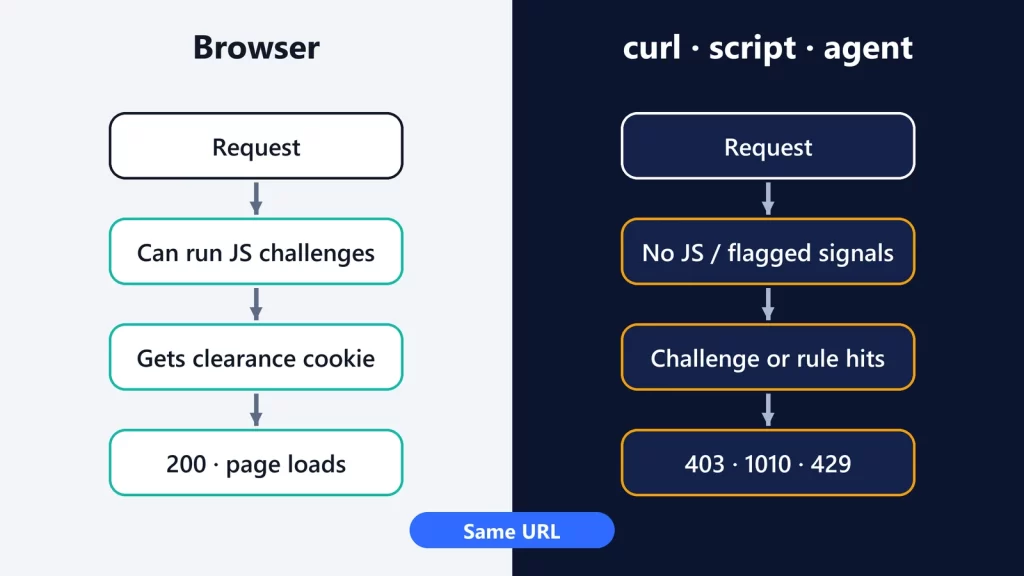
Every one of those interpretations can go wrong in ways a person wouldn’t notice: a field that wants a full name rather than first and last names, a custom date picker, a dropdown whose labels don’t match the values behind them. And when an agent’s request is blocked or challenged before it ever sees the page, that’s a different problem, which we covered in why a website works in your browser but returns 403 to an AI agent.
One support form, two ways
Take a customer-support page with a form: first name, last name, a dropdown for the kind of problem, and a Submit button. The user says to their browser’s agent: “Open a ticket, my package hasn’t arrived.”
Without WebMCP
- The agent reads the page and finds something that looks like the support form.
- It infers which inputs are the name fields and fills them.
- It opens the dropdown and has to decide which visible option fits “my package hasn’t arrived.” The labels are written for people; the routing logic behind them isn’t visible.
- It finds the button that probably submits the form, clicks it, and reads the next page to guess whether it worked.
With WebMCP
The site adds a few attributes to the same form. This is close to the example in Chrome’s Declarative API guide:
<form toolname="supportRequestTool"
      tooldescription="Submit a request for support.">
  …
  <select name="select" required
    toolparamdescription="Determines what team this request is routed to.">
    <option value="Distribution team">Check where my package is.</option>
    …
</form>
The browser turns that into a tool with a name, a description and a JSON Schema: the name fields become string parameters, and the dropdown becomes an enumerated parameter whose allowed values the agent can see. The agent no longer clicks through the form. It calls supportRequestTool with arguments. Chrome then brings the form into focus and fills it in, in view of the user. By default, a person still clicks Submit. The site can opt into automatic submission with a toolautosubmit attribute.
Chrome describes the result as more reliable than actuation and says WebMCP “can significantly improve the performance and reliability of agent actuation.” That’s Google’s claim. We haven’t seen independent, reproducible measurements of how much difference it makes, so treat it as the design goal rather than a number.
Two APIs: annotate a form or write a tool
- Declarative API. HTML attributes on an existing form (
toolname,tooldescription, optionaltoolparamdescription). When an agent invokes it, the submit event says so (agentInvoked), so the site can return validation errors or results to the agent instead of a new page. - Imperative API. JavaScript tools registered with
document.modelContext.registerTool(): a name, a description, an input schema and anexecutefunction. These can do things a form can’t, like filtering results, changing app state or navigating.
Both are progressive enhancements. People who never use an agent see the same page as before. The tools add a machine-readable layer on top of it.
Why WebMCP isn’t “MCP in the browser”
The Model Context Protocol connects AI apps to separate servers that publish tools, usually in front of a service’s API. WebMCP borrows the idea of discoverable tools with schemas, and the specification even describes WebMCP pages as something like MCP servers implemented “in client-side script instead of on the backend.” Chrome’s own comparison page is blunt that it’s “not an extension or a replacement of MCP.”
| MCP | WebMCP | |
|---|---|---|
| Where the tools live | A server, local or remote | The web page, in the user’s tab |
| Lifetime | Persistent | Exists only while the page is open |
| Who calls the tools | Any MCP-compatible AI app | An agent in or attached to the browser |
| Whose session it uses | Whatever credentials the server is given | The user’s live session, cookies and page state |
| Discovery | The client connects to a known server | The agent has to visit the page to find the tools |
| Built from | JSON-RPC and SDKs in many languages | HTML attributes or JavaScript in the page |
Google’s analogy: MCP is the company’s call center, available anywhere, while WebMCP is “the in-store expert” who only helps while you’re in the shop. They also aren’t rivals. A company could run an MCP server for background tasks and add WebMCP tools to its site for the moments when a user is on the page with an agent.
Where it stands, as of October 9, 2026
- Not a W3C standard. The specification is a Draft Community Group Report from the Web Machine Learning Community Group, last dated October 8, 2026. It says plainly that it “is not a W3C Standard nor is it on the W3C Standards Track.” Its editors work at Microsoft and Google.
- Experimental in Chrome. Developers can try it locally behind the
chrome://flags/#enable-webmcp-testingflag. Sites can switch it on for real visitors through an origin trial that runs from Chrome 149 to Chrome 156, the version now reaching stable. On September 28, the Chrome team asked to extend the trial through Chrome 162 to test changes prompted by trial feedback. - Chrome only, for now. Chrome Status lists “No signal” from both Firefox and Safari.
- Still changing. Chrome’s main WebMCP page was updated on October 7 and calls the API “subject to change.” Some details have already changed between Chrome versions.
Chrome also lists limitations. The API is designed mainly for browsing with “a human in the loop,” not headless automation. Complex sites may need refactoring. And agents can only discover a site’s tools by visiting it.
Debugging: what developers can see
Chrome DevTools has a WebMCP pane in the Application panel. It lists the tools registered on the page as an agent would see them, logs each invocation with the exact input the agent sent and the output it got, flags schema violations, and lets you run a tool manually without an agent. For a feature that’s still moving, that’s the most practical way to check that your form became the tool you intended.
The security questions it opens
The specification’s security section is unusually frank, and worth reading before you add tools to a logged-in site:
- Tool descriptions are prompts. A malicious site can hide instructions in a tool’s description or parameters (“tool poisoning”), and tool outputs can carry injected text from user content. It’s the same prompt injection problem, now with a formal channel.
- Intent can’t be verified. The spec’s own example is a tool named
finalizeCart, described vaguely, that actually buys the cart. Agents “cannot verify the tool’s actual effects before execution.” - Over-asking for data. A site can define extra parameters (age, location, purchase history) that a helpful agent fills in from what it knows about the user. The spec calls this a “personalization-to-fingerprinting pipeline.”
- The user’s session is live. Tools run with the user’s existing login, so a tool can do anything the logged-in user could.
The current mitigations are mostly signals, not guarantees. Tools can carry readOnlyHint, untrustedContentHint for user-generated output, and consequentialHint for actions such as bookings or payments, so the agent or browser can ask the user to confirm. A permissions policy keeps cross-origin iframes from registering tools by default, and sites can disable WebMCP entirely with a Permissions-Policy: tools=() header. Google’s own security guidance says it’s “impossible to guarantee safety inside of a large language model.”
Should you build for it now?
If you run a site with a high-value flow, such as support, booking or product configuration, WebMCP is worth prototyping behind the flag or in the origin trial. The Declarative API in particular costs little: a few attributes on forms you already have. Keep sensitive actions behind a human click, mark consequential tools as such, and don’t expose anything to an agent that you wouldn’t let a logged-in user do by hand. Just don’t plan on it as a stable interface yet. It’s one browser’s experiment, it hasn’t left the community-group stage, and the API is still moving.
Chrome documentation, Chrome Status and the WebMCP specification checked on October 9, 2026.