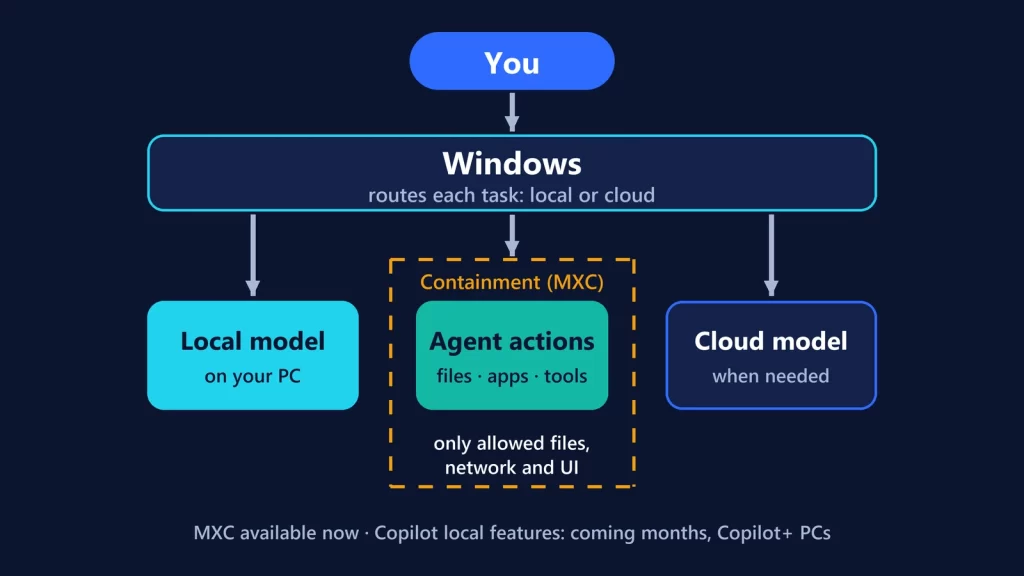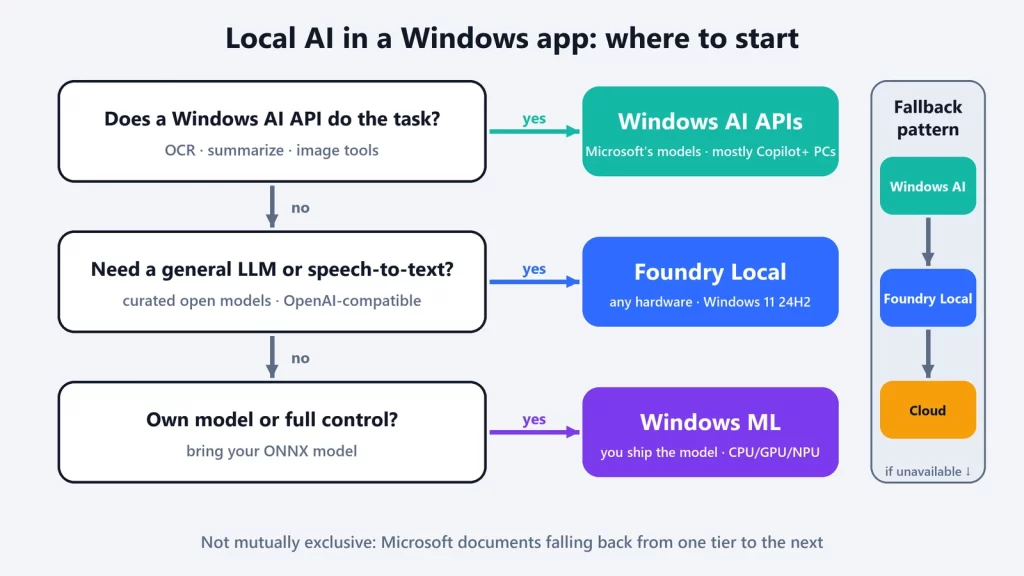
If you want to add local AI to a Windows app, Microsoft now offers three stacks, and they solve different problems. The Windows AI APIs are ready-made features, such as OCR, summarization or image description, built on models that Windows installs and manages, mostly on Copilot+ PCs. Foundry Local gives your app a curated catalog of open models, such as Phi, Qwen or gpt-oss, through an SDK or an OpenAI-compatible endpoint, on any recent Windows hardware. Windows ML runs your own ONNX model with control over the inference pipeline. Microsoft’s own advice is to check them in that order, and to combine them rather than pick one.
The naming problem first
Microsoft’s “Choose your Windows AI solution” page admits the space “has gone through rapid rebranding” and keeps a translation table for older names. The current umbrella brand is Microsoft Foundry on Windows, which covers all three stacks. Microsoft Foundry, without “on Windows,” is Microsoft’s cloud AI platform: “Different product, different team, similar name.” DirectML, the older GPU and NPU layer, is now in sustained engineering, and Windows ML’s execution providers are its replacement.
The three stacks, side by side
| Windows AI APIs | Foundry Local | Windows ML | |
|---|---|---|---|
| Who it’s for | App developers who want a finished AI feature with a few lines of code | Developers who want a general-purpose local LLM or speech-to-text inside their app | Developers with their own model, or a model from Hugging Face, who want control |
| Models | Microsoft’s, built into or downloaded by Windows and shared across apps | A curated catalog of 20+ open models (for example gpt-oss, Qwen, DeepSeek, Mistral, Phi, Whisper) | Yours: any model you can convert to ONNX |
| Hardware | Mostly Copilot+ PCs (NPU); a few APIs also run on certain GPUs or CPUs | Any x64 or Arm64 PC; uses CPU, GPU or NPU model variants as available | Any PC configuration; CPU, GPU or NPU through execution providers |
| Windows version | Windows 11 | Windows 11 24H2 or later for the Windows package | CPU and GPU (DirectML) on all supported versions; hardware-specific NPU and GPU providers need Windows 11 24H2 |
| API style | Windows App SDK (WinRT) classes, such as LanguageModel for Phi Silica |
In-process SDK for C#, JavaScript, Python and Rust; optional OpenAI-compatible REST endpoint | ONNX Runtime APIs; same code as standard ORT |
| Who ships the model | Windows | Foundry Local downloads it from Microsoft’s catalog on first use, then caches it | Your app, or your own download |
| Control | Lowest: fixed models and features | Medium: choose the model and generation settings | Highest: the whole inference pipeline |
| Portability | Windows only | Windows, macOS and Linux packages | ONNX models also run on ONNX Runtime elsewhere |
| On-device | Yes | Yes; offline after the first download | Yes |
The requirements come from Microsoft’s current pages for the Windows AI APIs, Foundry Local on Windows and Windows ML. One discrepancy to know about: Microsoft’s general overview page still lists Foundry Local as supporting “Windows 10 and later,” while the more recent Foundry Local getting-started page asks for Windows 11 24H2 for its Windows package.
Windows AI APIs: finished features, Microsoft’s hardware rules
These are the least work: call an API and get OCR text, a summary, an image description, a super-resolution image or a generated reply. Windows handles the model. The trade-off is hardware. Microsoft’s support table says that on a Copilot+ PC “supported APIs always run on the NPU,” and for most APIs that’s the only option. Text recognition (OCR), image description, object erase and image super resolution are NPU-only today. The exceptions are short:
- Phi Silica, the language model behind the text APIs, is listed for NVIDIA GeForce RTX 30 series and newer and AMD Radeon RX 9060 series and newer, with 6 GB or more of video memory. Right now that GPU path also requires a Windows Insider Experimental Channel build, an experimental Windows App SDK and Developer Mode, so it isn’t something to ship to customers yet.
- Video Super Resolution also runs on CPUs that meet Microsoft’s recommended specifications.
- Speech Recognition is marked experimental on both NPU and CPU.
Some models are preinstalled on Copilot+ PCs. Others, like Phi Silica’s GPU model, download on demand through Windows Update, “several GB.” Microsoft recommends asking the user before triggering that download. Phi Silica and image description aren’t available in China.
Phi Silica isn’t in the Foundry Local catalog
This is the easiest thing to mix up. Phi Silica is a Windows component: Microsoft’s NPU-optimized small model, reached only through the Windows AI APIs. It’s also a Limited Access Feature, which means apps need an unlock token from Microsoft. Phi-4-mini and other Phi models in Foundry Local are separate models that your app downloads from the catalog. Microsoft’s Foundry Local guide says it outright: “Phi-4 Mini is separate from Phi Silica.”
Phi Silica is also on its way out. Microsoft’s Phi Silica page says it’s being replaced by a new on-device model, Aion Instruct, which won’t need an unlock token. Microsoft’s timeline lists a test package in early October 2026. The model is scheduled to reach Windows Insider devices in November, and retail devices in January 2027, when Phi Silica is removed. If you’re starting a Windows AI API project now, plan for that switch.
Foundry Local: your choice of open model, packaged for shipping
Foundry Local is what Microsoft points to when the Windows AI APIs don’t cover your task or your users’ hardware. It ships as a native library that runs inside your app, not as a separate service. When you ask for a model by alias, such as phi-4-mini, it picks the variant that suits the device: Microsoft’s examples are a QNN NPU variant on Snapdragon, a CUDA variant on NVIDIA, or a CPU variant. It downloads that variant from Microsoft’s catalog and caches it. After that, Microsoft says, “models run entirely offline from the local cache.”
Two details matter for architecture:
- OpenAI-compatible, but optional. The SDK can start an OpenAI-compatible REST endpoint for tools that speak HTTP, such as LangChain. For a normal app, Microsoft recommends calling the SDK directly, with no HTTP overhead.
- Curated, not open-ended. Microsoft says Foundry Local “is designed for shipping production applications, not for general-purpose model experimentation.” The catalog is deliberately limited to models tested on consumer hardware. For trying any model you find, desktop tools like those in our Ollama vs LM Studio vs llama.cpp comparison are a better fit. Foundry Local is for putting a model inside a product.
Windows ML: bring your own model
Windows ML is Microsoft’s supported and maintained copy of ONNX Runtime. You bring a model in ONNX format, or convert one from PyTorch, TensorFlow or other frameworks, and run it with the same ONNX Runtime APIs. What Windows adds is hardware access: execution providers for NPUs and GPUs that “Windows installs and keeps up to date via Windows Update,” so your app doesn’t have to bundle vendor SDKs or ship separate builds per chip.
The price is responsibility. You choose and distribute the model, you handle its pre- and post-processing, and performance “varies based on device hardware.” Windows ML also sits underneath the other two: Microsoft describes it as “the foundation for the broader Windows AI platform,” and Foundry Local uses it on Windows to register execution providers. Which processor ends up doing the work, and why TOPS figures don’t settle it, is the subject of our NPU vs GPU vs CPU guide.
Which one for which job
| You need… | Windows AI APIs | Foundry Local | Windows ML |
|---|---|---|---|
| OCR on scanned documents | Best fit on Copilot+ PCs (NPU only) | Not its job | Possible with your own OCR model |
| Summarize or rewrite text | Best fit on Copilot+ PCs (Phi Silica’s text skills; unlock token required) | Best fit on other hardware | Possible, with much more work |
| A ready-made local LLM you can prompt freely | Phi Silica, with an unlock token, until Aion Instruct | Best fit | Possible if you package one yourself |
| Your own custom ONNX model | No | Possible by compiling it for Foundry Local | Best fit |
| An OpenAI-compatible local endpoint | No | Best fit | No |
| The widest range of PCs | No: mostly Copilot+ PCs | Yes, on Windows 11 24H2 | Widest: CPU and GPU on all supported versions |
| The least integration work | Best fit | Low | Highest |
| Full control over inference | No | Partial | Best fit |
Use more than one: Microsoft’s fallback pattern
Microsoft says plainly that “these options aren’t mutually exclusive,” and documents a three-tier pattern for a feature that has to work everywhere:
- Try the Windows AI API. Check readiness (
GetReadyState) and, if needed, ask Windows to prepare the model (EnsureReadyAsync). On a Copilot+ PC, this is the fastest and most optimized path. - If that’s not available, fall back to Foundry Local and run an open model such as Phi-4-mini on whatever hardware the PC has.
- If that fails too, fall back to the cloud, for example through Microsoft Foundry.
The point of the pattern is that a Copilot+ PC owner gets the NPU-accelerated version, and everyone else still gets the feature. The cost is that the three tiers use different models, so the same prompt can produce different answers depending on the machine. Test each tier, and decide whether the cloud tier, which sends data off the device, is acceptable for your users at all.
Whichever tier runs, memory is still the limit on what’s practical. We worked through those numbers in what AI you can actually run with 16 GB of RAM.
Microsoft documentation checked on October 9, 2026. The Windows AI APIs hardware table was last updated on October 8.