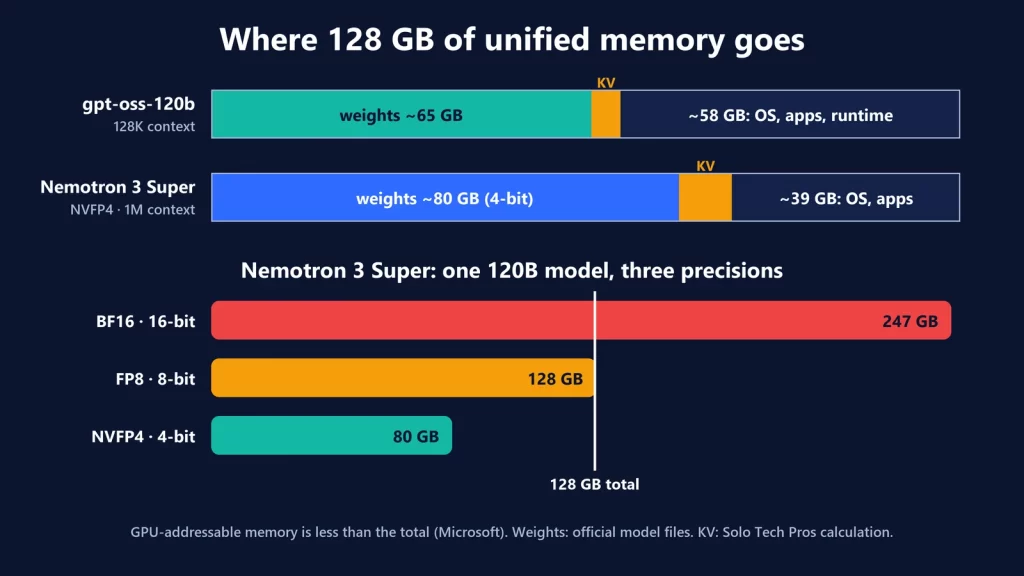
Microsoft says the new Surface Laptop Ultra, with up to 128 GB of unified memory shared by an NVIDIA GPU and CPU, can run AI models of around 120 billion parameters locally. That’s plausible, with conditions. A 120B model fits only when it’s heavily quantized: the same model needs about 247 GB at 16-bit precision, 128 GB at 8-bit and 80 GB at 4-bit. Windows, your apps and the model’s working memory all share the same 128 GB, and Microsoft says the GPU can address less than the total. And nobody can yet tell you how fast it runs, because the laptop doesn’t ship until October 16. Here’s how the memory budget actually breaks down.
What Microsoft and NVIDIA actually claim
Microsoft opened pre-orders on October 7. The facts that matter for local AI, from its announcement and product page:
- Chip: NVIDIA RTX Spark, combining a Blackwell RTX GPU with up to 6,144 cores and a Grace CPU with up to 20 cores.
- Memory: 24 GB to 128 GB of unified memory. On NVIDIA’s spec table, only the 20-core version goes up to 128 GB; the 18-core version tops out at 64 GB.
- Price and dates: from $2,599, available from October 16. The Surface RTX Spark Dev Box, a compact desktop with the same chip and 128 GB, costs $5,999 and ships in November, in the US only.
The “120B” claim is worded differently depending on where you look. Microsoft’s October post says “exceeding 120B parameters.” The Surface product page and NVIDIA’s RTX Spark page say “up to 120B.” NVIDIA’s launch announcement adds “with up to 1 million tokens context.” The footnote attached to the claim in Microsoft’s post refers to compute, “theoretical FP4 performance of 1 petaflop using the sparsity feature,” not to memory. None of these pages names a model, a quantization or a speed.
Then there’s the footnote that matters most: “128GB total system memory in a unified memory architecture dynamically shared between CPU and GPU. Maximum amount addressable by the GPU depends on system configuration and workload and is less than the total.” Microsoft doesn’t say how much less.
Unified memory: one pool, many tenants
A gaming laptop has two separate memories: system RAM for the CPU and VRAM on the graphics card. A large model has to fit in the VRAM, typically 8 to 16 GB on laptops, or get split with the slower CPU side. RTX Spark has one pool that both the CPU and GPU use. That’s why 128 GB changes what’s possible.
But everything else running on the laptop draws from that same pool: Windows, your browser, your IDE, the AI runtime itself and, if you’re coding with an agent, its tools. It works like the Apple Silicon Macs we covered in what AI you can run with 16 GB of RAM: the GPU can’t use every byte.
Parameters aren’t gigabytes
Two real, openly published models of the size Microsoft is talking about show the spread. The sizes come from the models’ official files on Hugging Face:
| Model and format | Total / active parameters | Weights on disk | Fits in 128 GB? |
|---|---|---|---|
| NVIDIA Nemotron 3 Super, BF16 (16-bit) | 120B / 12B | 247 GB | No |
| NVIDIA Nemotron 3 Super, FP8 (8-bit) | 120B / 12B | 128 GB | No: nothing left for anything else |
| NVIDIA Nemotron 3 Super, NVFP4 (4-bit) | 120B / 12B | 80 GB | Yes, with room to spare |
| OpenAI gpt-oss-120b (MXFP4 experts) | 117B / 5.1B | 65 GB | Yes, with room to spare |
So “runs a 120B model” really means “runs a 120B model with most of its weights compressed to about 4 bits.” That’s how these models are meant to be used. OpenAI ships gpt-oss-120b in that format and says it fits “into a single 80GB GPU,” and NVIDIA lists the Nemotron 3 Super model’s minimum hardware as one DGX Spark, NVIDIA’s earlier 128 GB unified-memory desktop. It also explains why the 64 GB configuration isn’t a 120B machine: neither model’s 4-bit weights fit in 64 GB, even before Windows takes its share. We compare the two sizes workload by workload in 64 GB vs 128 GB for local AI.
What “active parameters” do and don’t mean
Both models are mixture-of-experts (MoE) designs. For each token, only a fraction of the network runs: 12 billion parameters for Nemotron 3 Super, 5.1 billion for gpt-oss-120b. That cuts the computation per token, which helps speed. It doesn’t cut memory. The router can pick any expert for the next token, so all 120 billion parameters have to stay loaded. Size your memory for total parameters and judge speed by active ones.
The part that grows: context
The model’s working memory for a conversation, the KV cache, grows with every token of context. We explained the formula in the 16 GB guide. Here it’s the reason NVIDIA’s “1 million tokens” claim is plausible at all, because newer architectures keep the cache small:
- Nemotron 3 Super uses full attention in only 8 of its 88 layers; most of the rest are Mamba layers with a fixed-size state. From its published config, the cache works out to about 8 KB per token: roughly 1 GB at 128K tokens and about 8.6 GB at 1 million.
- gpt-oss-120b alternates full attention with layers that look back only 128 tokens. That’s about 37 KB per token: roughly 4.8 GB at its maximum of 131,072 tokens.
- For contrast, an older dense design: Qwen2.5-72B uses full attention in all 80 layers, about 330 KB per token, or roughly 10.7 GB at 32K tokens. At that rate, a million tokens would be far beyond any laptop.
These are our calculations from the models’ official config files, for a single conversation with a 16-bit cache. They exclude the runtime’s own buffers, which vary by app. Running several conversations or agents at once multiplies the cache.
A memory budget, not a benchmark
Putting it together for the 128 GB model. The weights and cache figures are from the sections above. The rest is the part nobody can measure until the hardware ships:
| Slice of the 128 GB | gpt-oss-120b, 128K context | Nemotron 3 Super NVFP4, 1M context |
|---|---|---|
| Model weights | about 65 GB | about 80 GB |
| KV cache, one conversation | about 5 GB | about 9 GB |
| Left for Windows, apps, runtime buffers and the GPU-addressable limit | about 58 GB | about 39 GB |
Both fit on paper. The bigger unknown is the ceiling Microsoft mentions: how much of the 128 GB the GPU can actually address. If you work out your own budget, start from that number once it’s documented or measured, not from 128, and leave headroom for everything else you run.
Why “it fits” isn’t “it’s fast”
Fitting decides whether a model loads. Several other things decide whether it’s pleasant to use:
- Memory bandwidth. Generating each token means reading the active weights from memory, so bandwidth sets a hard limit on speed. Neither Microsoft’s nor NVIDIA’s product pages that we checked list RTX Spark’s memory bandwidth.
- Prompt processing. Reading a long document or codebase before the first word of the answer is a separate, compute-heavy step. A million-token context is something the memory can hold. That doesn’t mean you’ll want to wait for it.
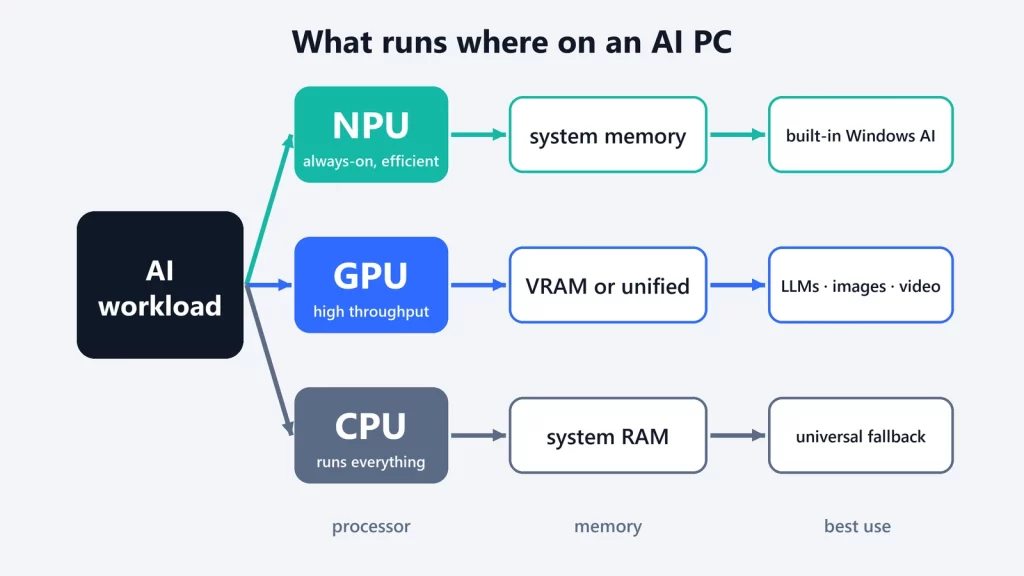
- Runtime support. This is a Windows on Arm machine with an NVIDIA GPU. NVIDIA points developers to CUDA, TensorRT and its NVFP4 format, and Microsoft to Windows ML with NVIDIA’s TensorRT for RTX. Check that the app you use, such as one of the runtimes in our Ollama vs LM Studio vs llama.cpp comparison, supports this platform and the model’s format. As we explained in NPU vs GPU vs CPU, the software path decides which hardware does the work.
- Sustained load on a laptop. Microsoft cites a thermal design with up to 2.5 times the thermal capacity of its current Surface Laptops. How that holds up under long AI workloads, and what it does to battery life, is unknown until independent testing.
As of October 9, there are no independent benchmarks of shipping units. Microsoft’s “interactive speeds” claim for the Dev Box is a vendor statement, not a measurement you can check yet.
Who the 128 GB version is for
If your goal is to run 120B-class open models locally, for privacy, for offline work or to avoid per-token costs on long agent sessions, the 128 GB configuration is the only one in the range that makes sense, and it gives the models real room. If you mostly run models in the 8B to 30B range, smaller configurations of this machine, or other hardware, can serve you fine. Either way, plan around the model’s total size at the quantization you’ll actually use, plus the context you need, plus everything else on the machine. The parameter count on the box is only the start of that calculation.
Specifications, prices, dates and model files checked on October 9, 2026.