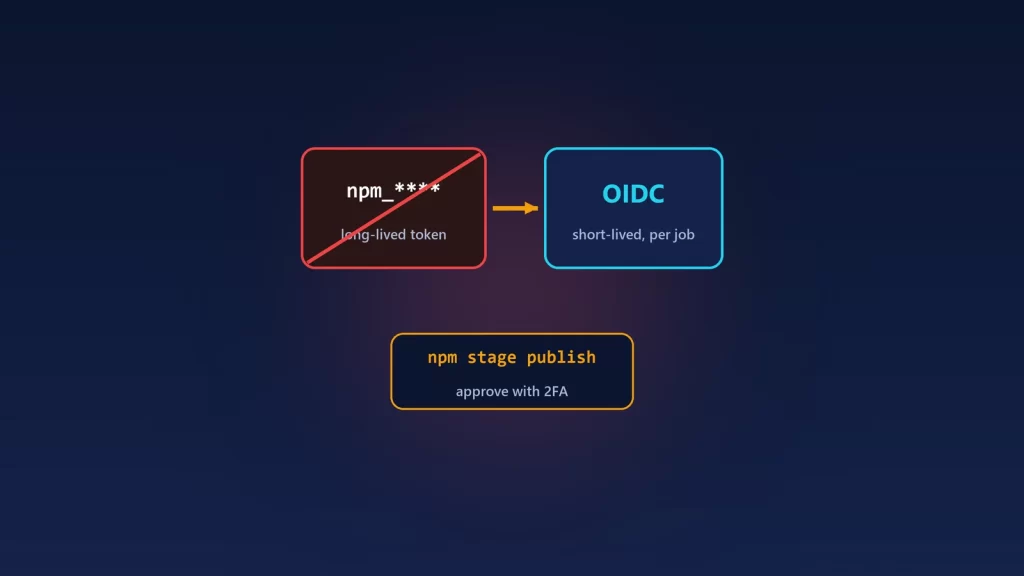
If you publish npm packages from CI with a long-lived token, you have until about January 2027 to change it. npm says granular tokens that bypass 2FA will then stop publishing directly, and they’ll only be able to stage a release for a human to approve. You have two supported routes. Trusted publishing uses short-lived OIDC credentials from GitHub Actions, GitLab or CircleCI, so there’s no npm token stored in CI. Staged publishing has CI submit a version that a maintainer approves with 2FA. npm recommends using them together. Several rules changed between July and October 2026, so setups built from older tutorials can fail in new ways. This is the current picture, all from npm’s own changelog and docs.
What changed, in order
| Date | Change | What it means for you |
|---|---|---|
| Nov 5, 2025 | Granular write tokens capped at 90 days, 2FA by default, optional “Bypass 2FA” for CI | A token that worked for months suddenly stops: check its expiry first |
| Dec 9, 2025 | Classic tokens revoked; npm login gives two-hour session tokens |
Any CI still using a classic token fails with an authentication error |
| Jul 8, 2026 | Deprecation announced: bypass-2FA tokens lose account actions, then direct publish | The January 2027 target starts here |
| Jul 31, 2026 | Bypass-2FA tokens restricted: creating tokens or changing maintainers, access or trusted publishing now need interactive 2FA | Scripts that manage tokens or maintainers with a CI token now fail |
| Sep 3, 2026 | Multiple trusted publishing configurations per package; new ones stage by default | A new configuration may only stage unless you allow direct publish |
| Sep 18, 2026 | Stage-only tokens | A token-based path that already matches the 2027 rules |
| Sep 30, 2026 | Opt-in dist-tag permission for trusted publishing | You can drop the token you kept just for moving latest or next |
| Oct 2, 2026 | Unvalidated configurations expire after 48 hours; issue_comment events rejected |
Set up trust, then publish within two days |
| Oct 2, 2026 | Staged publishing can create new packages | No more manual first publish just to create the package |
January 2027 is a target, not a fixed date. npm says it’s “targeting” it and expects the change “around” then. Treat it as a deadline anyway.
Which route to choose
Trusted publishing, if your CI is supported
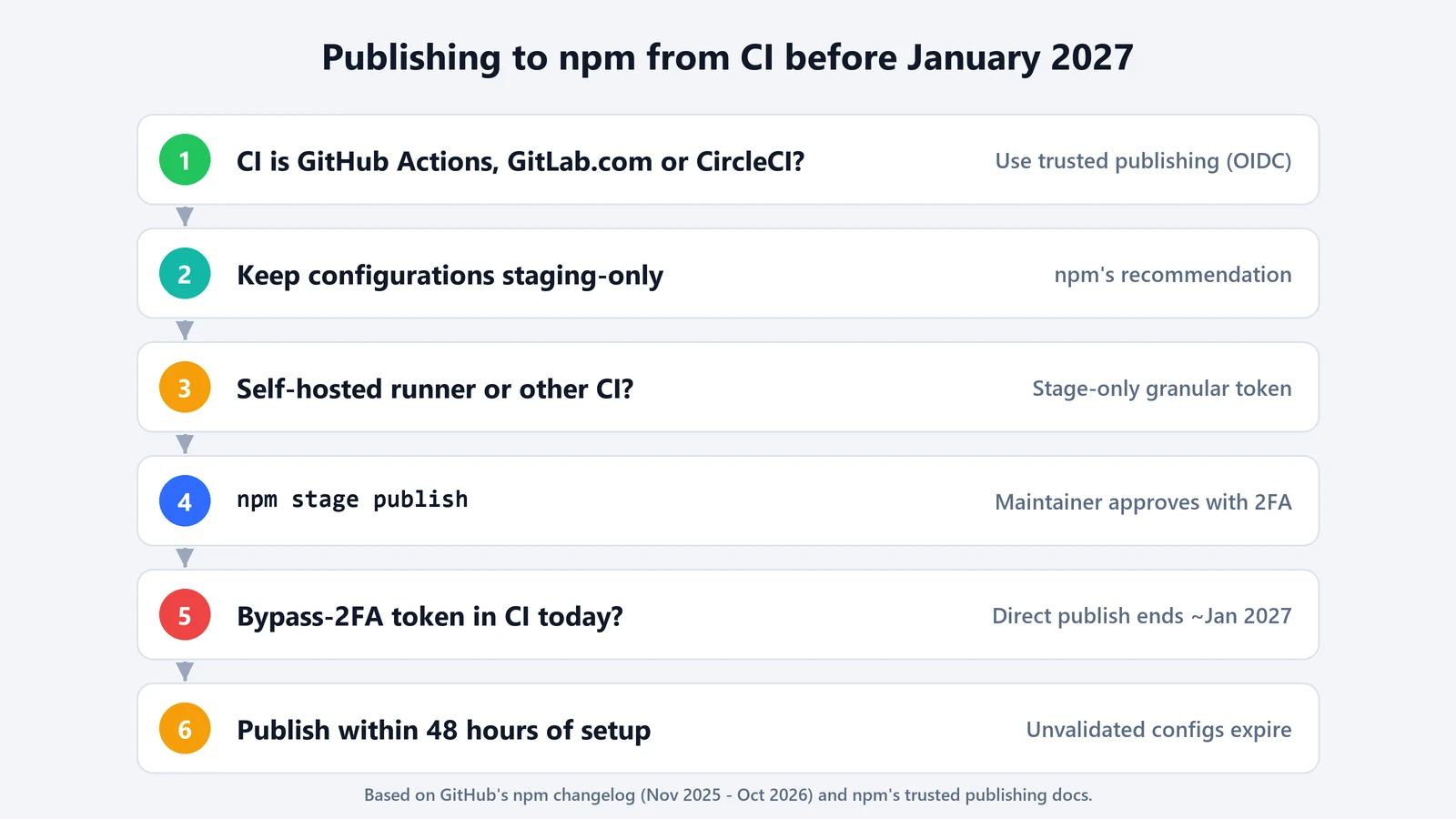
Trusted publishing replaces a stored npm token with a short-lived credential that your CI provider issues for one job. According to npm’s documentation, it works with GitHub Actions on GitHub-hosted runners, GitLab CI/CD on GitLab.com shared runners, and CircleCI cloud. Self-hosted runners aren’t supported yet. You need npm CLI 11.5.1 or later and Node.js 22.14.0 or later.
You set it up on the package’s settings page on npmjs.com, under Trusted Publisher, by naming the repository and workflow. On GitHub Actions, the workflow needs the id-token: write permission. Then publish within 48 hours, because the first successful publish validates the configuration. If it expires first, delete it and create it again.
Staged publishing, if you want a human gate
With staged publishing, CI runs npm stage publish instead of npm publish. The version waits in a queue until a maintainer approves it with 2FA. Since September, the approve button stays disabled until npm’s malware scan of the package finishes. This needs 2FA on the maintainer’s account, npm CLI 11.15.0 or later and Node.js 22.14.0 or later.
npm’s recommendation is to combine the two. Every trusted publishing configuration can stage, and since September 3 direct publishing is something you opt into for each configuration. In npm’s words: “We recommend keeping your configurations to staging only.” A compromised workflow can then submit a release, but not ship one.
Stage-only tokens, if you can’t use OIDC yet
If your CI isn’t supported, for example a self-hosted runner, create a granular token with Read and write (stage only) and switch your workflow to npm stage publish. npm rejects direct publishes with that token, even if it’s set to bypass 2FA, so it already behaves the way all bypass-2FA tokens will after the cut-off. It can still move dist-tags and deprecate versions, so guard it like any other write token.
Errors you’re likely to hit
- E401 or “Unable to authenticate” with a token. Check whether it’s a revoked classic token or an expired granular one. Write tokens last 90 days at most.
- ENEEDAUTH with trusted publishing. npm’s docs say to check first that the workflow filename matches exactly what you entered on npmjs.com, including
.yml. All fields are case-sensitive. Also confirm you’re on a GitHub-hosted runner. - It worked, then stopped before the first release. The configuration expired after 48 hours without a successful publish. Recreate it.
- Publishing from a comment-triggered workflow fails. npm now rejects OIDC tokens from
issue_commentevents, as it already did forpull_request_target. Usepush,releaseorworkflow_dispatch. - The version doesn’t appear on npm. If your configuration is staging-only, it’s waiting for approval in the package’s staged queue.
- A token can’t add a maintainer or create a token anymore. That’s the July 31 restriction. Do it interactively with 2FA.
One more check while you’re at it: npm’s docs say provenance statements aren’t generated for packages published from private repositories, even public packages. If you rely on provenance, publish from a public repo.
The common thread: a single stolen publish token used to be enough to push a malicious version to everyone who installs your package. Short-lived credentials and a 2FA approval step make that much harder, which is why npm is pushing every publisher in that direction.