The first independent reviews of Microsoft’s Surface Laptop Ultra are in, and they answer most of the questions that couldn’t be answered at launch. The GPU doesn’t get all 128 GB: reviewers found a 64 GB share by default on the 128 GB model, adjustable to 96 GB. Memory bandwidth works out to about 300 GB/s. Models in the 27B to 35B range run at practical speeds, mixture-of-experts models especially. Running AI on battery costs around a fifth of the speed. One thing is still untested: none of the reviews we read ran a 120B-parameter model, the size Microsoft advertised.
When the laptop was announced, we went through what 128 GB of unified memory buys for local AI and listed what couldn’t be known before shipping. Here’s what the reviews settle, and what they don’t.
How much memory the GPU actually gets
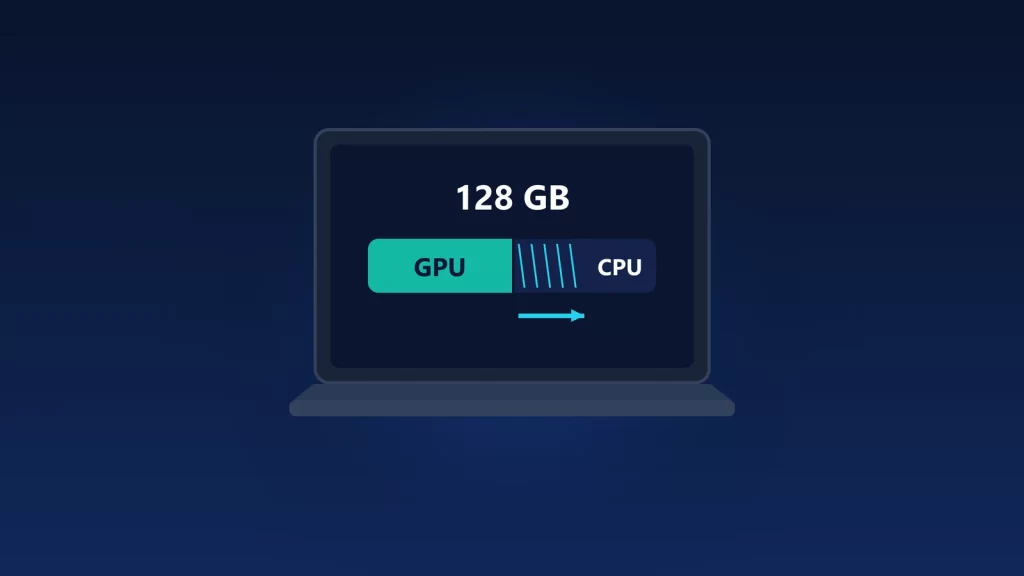
Microsoft’s footnote said the GPU can address less than the total and didn’t say how much. StorageReview tested the full 128 GB configuration and found that Windows “presents it like a discrete card, with a fixed dedicated allocation and a shared pool.” Their unit shipped with a 64/64 GB firmware split, and the user can raise the GPU’s share to 96 GB.
Smaller configurations get proportionally less. Tom’s Hardware reviewed a 32 GB unit that had 12 GB dedicated to the GPU out of the box, also adjustable, and called 32 GB “tight for AI.”
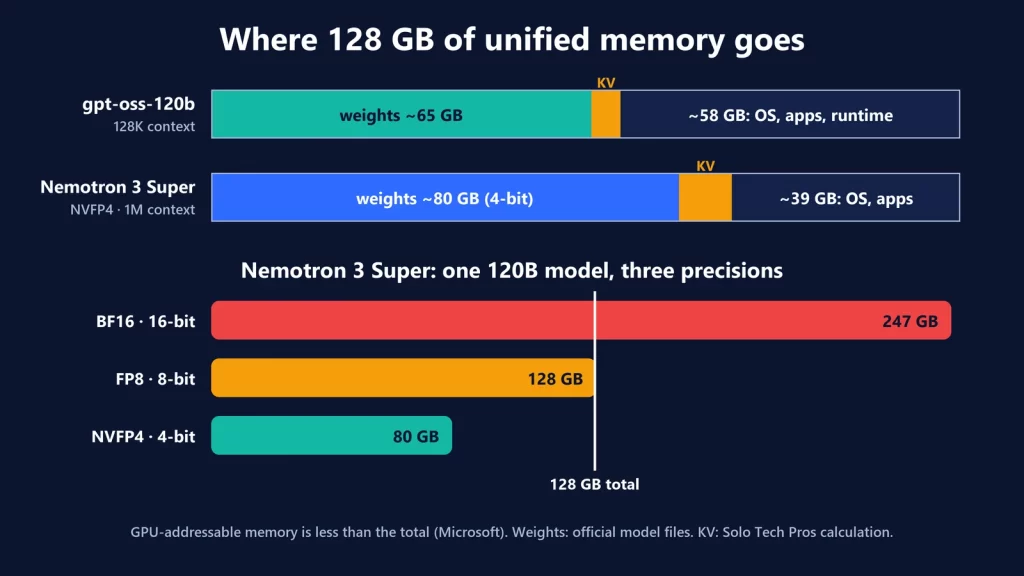
That matters for the 120B claim. In our launch analysis, gpt-oss-120b needed about 65 GB of weights and Nemotron 3 Super about 80 GB at 4-bit. By our arithmetic, neither fits in the default 64 GB GPU share on the 128 GB model. Both should fit once the allocation is raised toward 96 GB, but no review has tested that yet.
Bandwidth: the number that sets the speed
Neither Microsoft nor NVIDIA listed memory bandwidth at launch. StorageReview worked it out from the memory: LPDDR5-9400 on a 256-bit interface gives “about 300GB/s of theoretical bandwidth,” the same ceiling Tom’s Hardware cites for the platform. That’s below what you’d expect from the GPU’s size. Tom’s Hardware notes the RTX 5060 laptop GPU alone gets 384 GB/s of dedicated memory bandwidth.
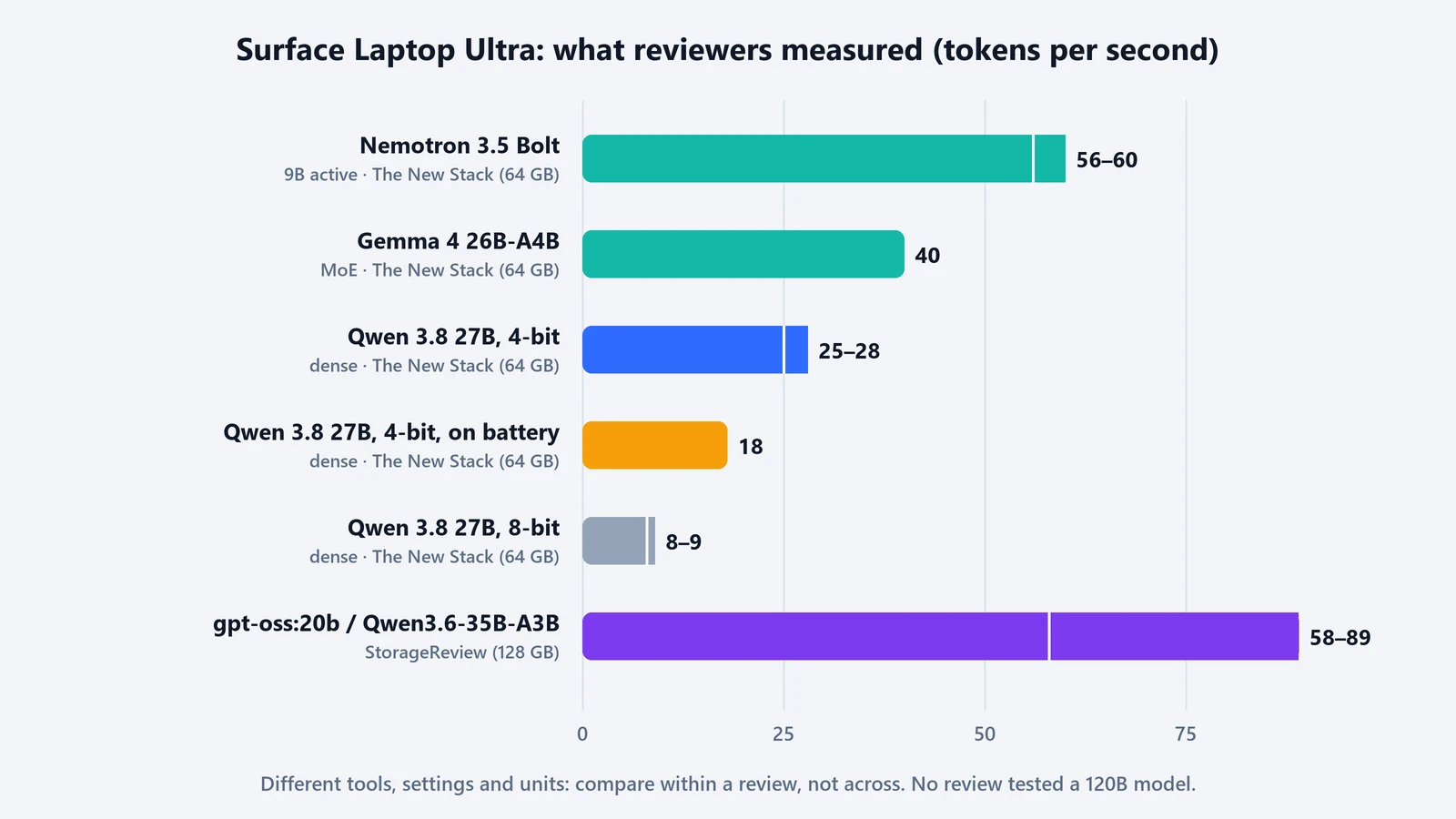
Bandwidth shows up most with dense models, where every token reads every weight. The New Stack ran a dense Qwen 3.8 27B and got no more than 8 or 9 tokens per second at 8-bit, which it blamed on bandwidth. Dropping to 4-bit roughly tripled the speed to 25 to 28 tokens per second.
What reviewers measured
| Review (configuration) | Workload | Result |
|---|---|---|
| StorageReview (128 GB) | gpt-oss:20b and Qwen3.6-35B-A3B in a coding agent | 58 to 89 tokens/s; the 35B tasks finished in under 90 seconds |
| Tom’s Hardware (128 GB) | AgentPerf-local, dense Qwen 3.8 27B | About 8 minutes, versus about 10 for a 14-inch MacBook Pro with M5 Max |
| The New Stack (64 GB) | Qwen 3.8 27B, dense | 8 to 9 tokens/s at 8-bit; 25 to 28 at 4-bit |
| The New Stack (64 GB) | Gemma 4 26B-A4B, mixture of experts | Around 40 tokens/s |
| The New Stack (64 GB) | Nemotron 3.5 Bolt (9B active) | 56 to 60 tokens/s |
These come from different tools, settings and units, so compare within a review rather than across them. Two patterns are consistent. Mixture-of-experts models, which read only a few billion parameters per token, are the sweet spot. And a dedicated gaming GPU is still faster on models that fit in its memory: StorageReview found a Razer Blade 16 with an RTX 5090 “2.3x faster on anything that fits in 24GB.” It couldn’t run the larger models at all.
We explained the difference between total and active parameters, and why context adds memory on top of the weights, in 64 GB vs 128 GB for local AI.
On battery and under sustained load
- Battery costs speed. Microsoft says the laptop keeps nearly all its performance on battery. For AI workloads, The New Stack measured otherwise: its 4-bit Qwen dropped from 25 to 28 tokens per second to about 18, and it estimates “around a 20% to 25% loss in performance.” It didn’t run formal battery tests, but wouldn’t expect “more than a few hours” of steady local AI work.
- Battery life in general use varies by test. Tom’s Hardware got 10 hours 43 minutes on its web, video and graphics test with the 32 GB unit. Computerworld got 14 hours 35 minutes on PCMark video playback with 128 GB.
- A power-loss problem under heavy compute. StorageReview’s unit lost power outright three times in one evening during an all-core double-precision math test, the heaviest floating-point load in its suite, after “an earlier review unit failed the same way and had to be replaced.” Windows logged a hard power cut, not a thermal shutdown, and the failure was repeatable to the second. This was a CPU number-crunching test, not AI inference, and no other reviewer we read reported it. It’s still worth watching if you plan to run long, heavy workloads.
What’s still unknown
- The 120B claim. The largest models in these reviews were around 35B parameters. Nobody we read loaded a 120B model, raised the GPU allocation to fit one, or measured its speed.
- Long-context behavior. StorageReview’s agent tests ran at a 64K-token context. The 1-million-token figure NVIDIA cited hasn’t been measured.
- Whether the power-loss issue is widespread, and whether a firmware or driver update addresses it.
Who should buy which configuration
The reviews back up the main point of our launch analysis: memory decides what loads, bandwidth decides how fast it runs. On this machine, that favors mixture-of-experts models and 4-bit quantization. The 128 GB model at $5,899.99 is the only one with room for 100B-class models, and The New Stack notes that most of the smaller models people run right now are in the 27B to 30B range, which the 64 GB configuration handles with headroom. If you want 120B-class models specifically, wait until someone has actually run one on it. For runtime choice, every NVIDIA-side test StorageReview ran used native Arm64 builds of llama.cpp and Ollama, two of the options in our local AI runtime comparison.
We haven’t tested a Surface Laptop Ultra ourselves. All measurements are from the reviews linked above, checked on October 16, 2026.