Going from 64 GB to 128 GB of unified memory doesn’t change which mid-size models you can run. A 27B model or a 4-bit 70B model fits in either. It changes three things. Models above roughly 100 billion parameters fit at all. Long contexts and several agents can run at once without crowding each other out. And you get headroom for a second model or a heavier workload beside the first. NVIDIA’s new 64 GB DGX Spark puts this choice on the table: NVIDIA rates it for models “up to 100B parameters” and the 128 GB version for up to 200B. Here’s what those numbers mean in practice, and what they don’t.
What NVIDIA announced
On October 2, NVIDIA announced a 64 GB configuration of DGX Spark, its small Grace Blackwell desktop. It goes on sale on October 23 from Acer, ASUS, Dell, Gigabyte, HP and MSI only, starting at $4,999. NVIDIA says it keeps the same GB10 chip, DGX OS and software stack as the 128 GB model. On the product page, both versions list the same 273 GB/s memory bandwidth.
NVIDIA’s own sizing:
- One 64 GB unit: up to 100B parameters.
- One 128 GB unit: up to 200B parameters.
- Two 64 GB units linked through their ConnectX-7 ports: memory pooled to 128 GB, up to 200B parameters, with “twice the memory bandwidth.” In NVIDIA’s own test with Qwen 3.8 27B, the pair delivered “up to 1.7x performance” compared with one unit.
Those parameter limits assume compressed models. The rest of this article is about why.
Parameters are not gigabytes
Memory use depends on how many parameters a model has, how many bits each one is stored in, and how much context you give it. Here are real download sizes from Ollama’s model library:
| Model | 4-bit | 8-bit | 16-bit |
|---|---|---|---|
| Qwen 3.8 27B | 18 GB | 30 GB | 56 GB |
| Llama 3.3 70B | 43 GB | — | — |
| gpt-oss-120b (117B, ships in 4-bit MXFP4) | 65 GB | — | — |
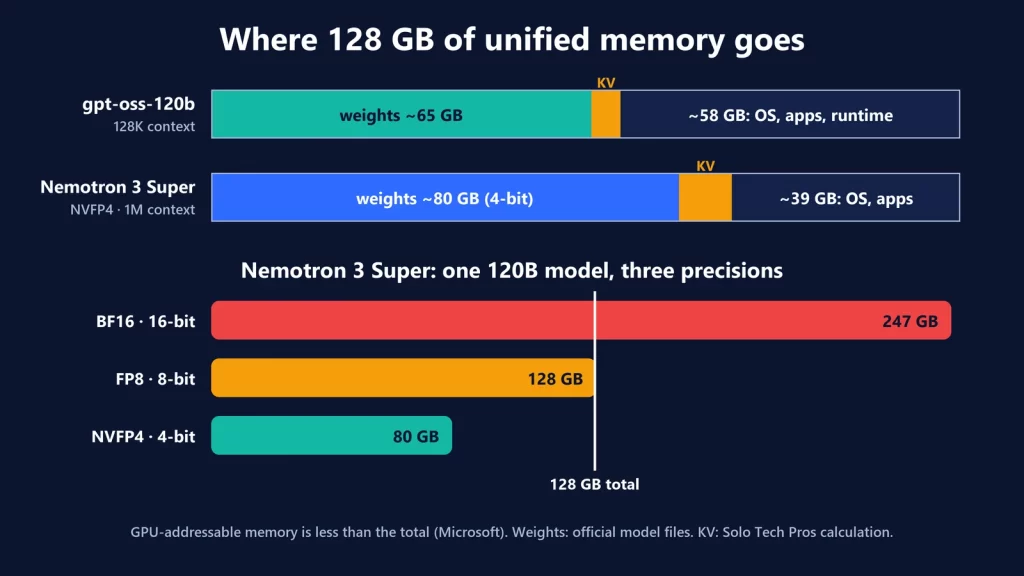
| Nemotron 3 Super 120B | 87 GB | 132 GB | 247 GB |
That’s where NVIDIA’s “up to 100B” for 64 GB comes from: at about 4 bits per weight, a 100B model comes to roughly 60 GB by our arithmetic. It also shows the edge cases. gpt-oss-120b’s 65 GB of weights alone exceed a 64 GB machine, and even at 4 bits, Nemotron 3 Super needs the 128 GB one. The full breakdown of where unified memory goes, including the GPU-addressable limit and the OS share, is in our Surface Laptop Ultra 128 GB analysis.
Context is the second budget
The weights are fixed. The KV cache, the model’s working memory for a conversation, grows with every token, and how fast it grows depends on the architecture. From the models’ published configuration files, with a 16-bit cache, for one conversation:
- Qwen 3.8 27B uses full attention in 16 of its 64 layers. That’s about 64 KB per token, so roughly 8.6 GB at 128K tokens and 17 GB at its 262K maximum.
- A dense 72B model (Qwen2.5-72B, full attention in all 80 layers) needs about 330 KB per token, roughly 10.7 GB at just 32K tokens.
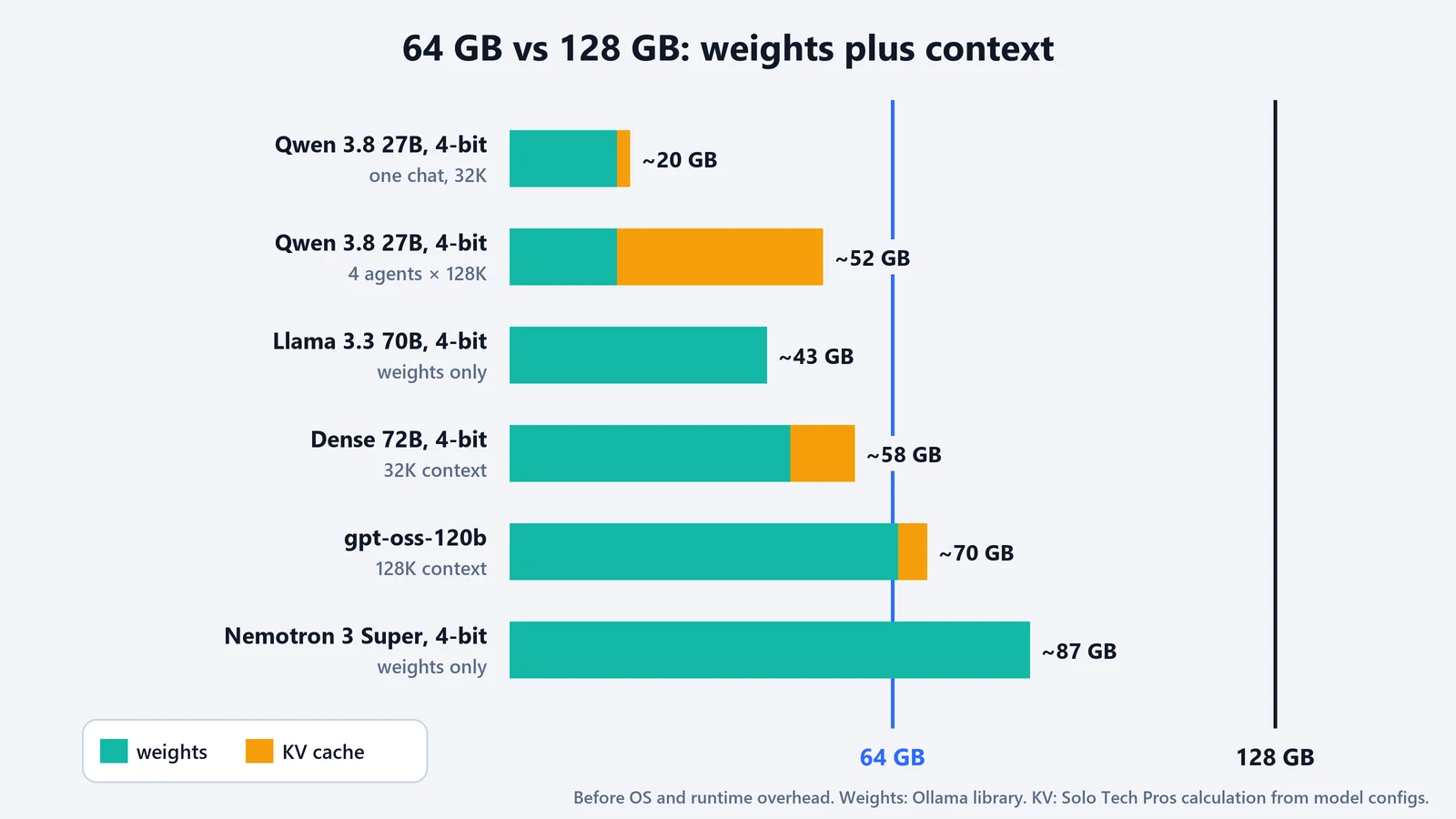
These are our calculations, not measurements, and runtimes add buffers on top. The formula is explained in our 16 GB guide. The point here: on a 64 GB machine, a 4-bit 72B model (47 GB) plus a 32K context (about 11 GB) already uses about 58 GB, before the operating system takes its share. “It fits” quickly becomes “it barely fits.”
Concurrency multiplies everything
NVIDIA pitches DGX Spark for agents that run “around the clock,” and says a two-unit cluster adds capacity for “larger models, longer context windows or multiple agents working at once.” The arithmetic shows why. Four agents, each with a 128K context on Qwen 3.8 27B, need about 18 GB of weights plus about 34 GB of cache: roughly 52 GB. That’s possible on 64 GB with little to spare. On 128 GB, it leaves room for a second model, a bigger context or more agents. Ollama’s documentation makes the same point in general terms: required memory scales with the number of parallel requests times the context length.
Workload by workload
| Workload | 64 GB | 128 GB | What changes |
|---|---|---|---|
| 8B–30B models | Comfortable, even at 8-bit | Comfortable, even at 16-bit for many | Precision headroom, little else |
| ~70B model, 4-bit | Fits, with modest context | Fits with long context | How much conversation you can keep |
| 100B+ models, 4-bit | At or beyond the limit (gpt-oss-120b’s weights alone are 65 GB) | Fits | Whether the model runs at all |
| Long context (128K+) | Fine with efficient architectures; tight with dense 70B | Room for long context on larger models | Which model and context combinations work |
| Two models at once | Two small or mid-size models | A large model plus a helper model | Which models can run side by side |
| Several agents | A few, on a mid-size model | More agents, or bigger models per agent | Parallel caches |
| Image or video generation | Competes for the same pool as any language model you keep loaded | More room to keep both loaded | Whether creative and language models can stay resident together (sizes vary by model) |
| Fine-tuning | NVIDIA doesn’t publish a figure | NVIDIA says up to 70B parameters | Training needs far more memory than inference |
The fine-tuning row has the starkest gap. NVIDIA rates the 128 GB DGX Spark for inference “up to 200 billion parameters” but for fine-tuning only “up to 70 billion parameters.” Training keeps much more in memory than running a model does.
What 128 GB doesn’t buy
- Speed. The two DGX Spark configurations list the same 273 GB/s bandwidth and the same chip. More memory lets bigger models load; it doesn’t make a given model generate faster. NVIDIA’s speed gain comes from clustering two units, not from more memory in one.
- Measured results. The 64 GB version isn’t on sale until October 23. We haven’t tested either configuration, and we have no tokens-per-second, thermal or noise figures to share.
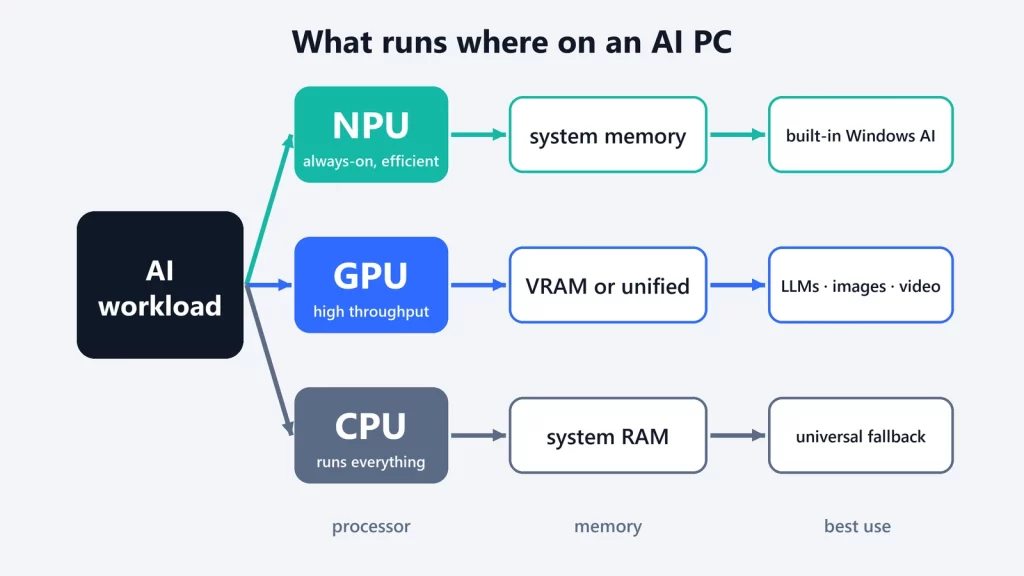
- A different processor story. All of this is GPU work on unified memory. The NPU question doesn’t apply here, as we explained in NPU vs GPU vs CPU for local AI.
Which one to choose
Choose 64 GB if your models are in the 8B to 70B range, you run one main model at a time, and moderate context is enough. That covers a lot of serious local work. Choose 128 GB, or plan on clustering two 64 GB units, if you want 100B+ models, long contexts on large models, several agents at once, or fine-tuning. Either way, size the memory for the total weights at the precision you’ll use, plus context times concurrency, plus the operating system. Then judge speed separately, from bandwidth and independent tests.
NVIDIA announcement and specifications, Ollama library sizes and model configs checked on October 9, 2026.