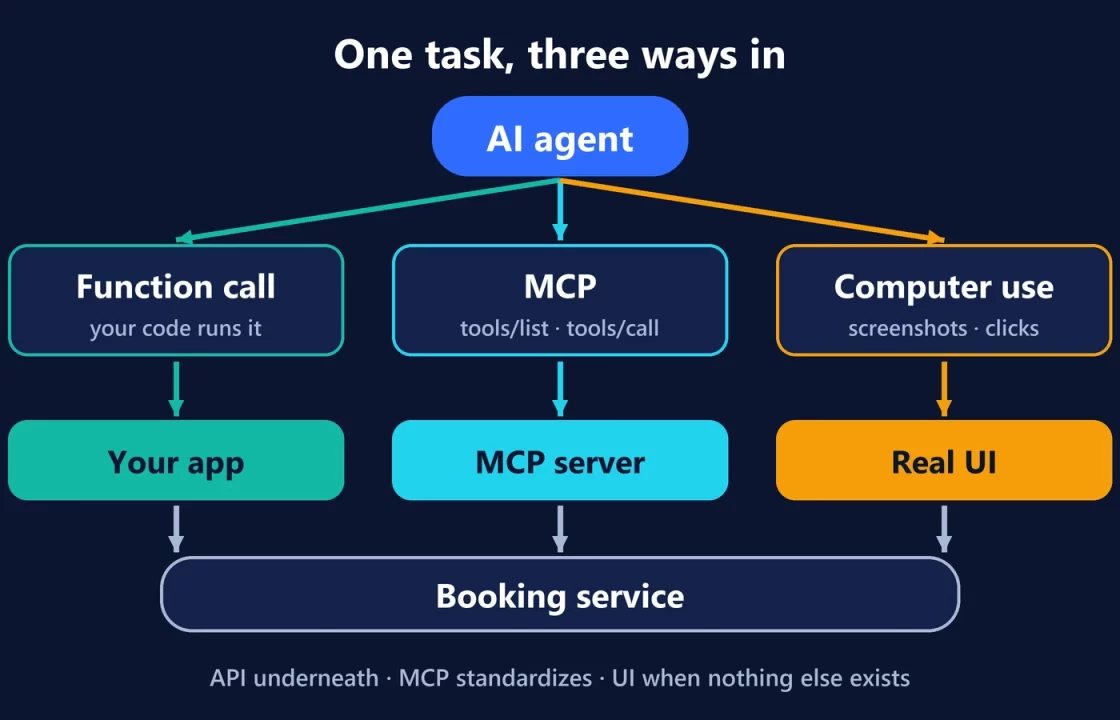
AI agents reach other software in three main ways. A function call lets the model request an operation your own code defines and runs. MCP lets any compatible AI app discover and use tools that a separate server publishes. Computer use lets the model operate a real interface, through screenshots, clicks and typing, when there’s no better way in. They aren’t rival versions of the same thing: they sit at different layers, and the right choice depends on who controls the integration and whether a clean interface exists at all.
The easiest way to see the difference is to give all three the same job.
One task, three paths
The task: “Move my Thursday appointment to Friday afternoon” in an online booking service.
Path 1: an API through function calling
- You, the developer, define a tool, say
reschedule_appointment(appointment_id, new_time), with a JSON schema for its inputs. - The model reads the request and returns a tool call with arguments instead of a text answer. OpenAI’s function-calling guide describes this as the model determining it “needs to call one of the tools we made available to it.”
- Your code runs the operation against the booking service’s API, using your credentials and your validation rules, and sends the result back.
- The model replies to the user with the outcome.
The model never touches the booking service directly. It can only ask for operations you chose to expose, in the shape you defined.
Path 2: an MCP server
- The booking provider, or someone else, runs an MCP server that exposes tools like “list appointments” and “reschedule appointment,” plus resources such as your upcoming bookings.
- An MCP host (an AI app like Claude, ChatGPT or Visual Studio Code, in the MCP architecture) connects to it and discovers what’s available with
tools/list. - When the model wants to reschedule, the host calls the tool with
tools/call, and the server does the work. Usually it calls the booking service’s own API behind the scenes.
The difference from path 1 isn’t the operation. It’s who defines it and how many apps can use it. The server is written once, and any MCP-compatible client can use it without each app building its own integration. The MCP project describes itself as “an open-source standard for connecting AI applications to external systems,” and compares it to a USB-C port. It standardizes the connection; it doesn’t replace the API underneath.
Path 3: computer use
- The agent opens the booking website in a browser or desktop session your application provides.
- It takes a screenshot, decides what to do (click My appointments, open Thursday’s booking, pick a Friday slot), and acts with mouse and keyboard actions or by writing a Playwright or PyAutoGUI script. That’s how OpenAI’s computer use guide describes the two integration styles.
- It checks the new screenshot and repeats until the change is confirmed on screen.
No API needed. The agent uses the same interface a person would, which is exactly why it works where nothing else does, and why it’s the most sensitive to the page changing.
Where each one fits
| Function calling (API) | MCP | Computer use | |
|---|---|---|---|
| Use it when… | you’re building one application and want precise control over every operation | many AI apps or agents need the same capabilities, or the provider already publishes a server | there’s no usable API, or you need to test or operate the real user interface |
| Avoid it when… | you’d be rebuilding the same integration for every AI client | you can’t vet who runs the server, or one fixed integration is all you need | a clean API or MCP server exists for the task |
| Main strength | Explicit, validated, predictable operations | Standard discovery and reuse across clients | Works with any interface a person can use |
| Main risk | Bugs or over-broad operations in your own tool design | Trusting a third-party server: its tools can request data and change behavior | Fragile to UI changes; screen content can carry prompt injection |
The safety model changes with each path
Function calling keeps the decisions in your code. The model proposes; your application validates and executes. Most of the risk sits in how broad you make each operation.
MCP moves trust to the server operator. OpenAI’s MCP guide is direct about it:
- “A malicious server can exfiltrate sensitive data.”
- Servers “may update tool behavior unexpectedly.”
- Malicious servers “may include hidden instructions.”
Its recommendations are to connect to official servers hosted by the provider itself, log what you send, and require approval for sensitive actions. The Responses API’s MCP tool asks for approval of each call by default.
Computer use needs the strongest boundaries, because everything on screen is input. OpenAI’s guidance:
- “Use an isolated browser or VM and an allow list of sites and actions.”
- “Treat screen content as untrusted.”
- Keep users in control of “purchases, data transmission, destructive changes,” noting that “typing sensitive information into a form counts as transmission.”
That’s the same trust-boundary problem we described in prompt injection, the phishing attack of AI agents.
They usually work together
Real agents mix all three. A coding agent might call its own functions to run tests, use an MCP server for an issue tracker, and fall back to a browser session to check a page that has no API. The Codex and ChatGPT Work tools we looked at this week, for instance, combine plugins with a built-in browser that can use tools supported websites provide.
A practical rule of thumb: prefer the most structured path the service offers. Use an official API or MCP server when one exists, keep function calls narrow, and treat computer use as the powerful last resort that it is, with an isolated environment and a human approving anything that can’t be undone.
Documentation checked on October 9, 2026.