Prompt injection is what happens when text an AI reads, on a webpage, in a file or in an email, tries to give it instructions you never gave. OpenAI compares it directly to phishing: “In the same way that phishing emails or scams on the web attempt to trick people into giving away sensitive information, prompt injections attempt to trick AIs into doing something you did not ask for.” A chatbot that only talks can be tricked into saying something wrong. An agent that can browse, open files and use tools can be tricked into doing something.
It’s no longer “ignore previous instructions”
The early version of the attack was crude: plant a line of text telling any AI that reads it to do something else. OpenAI says models have become less vulnerable to that kind of suggestion, and that attackers have adapted. In its March 2026 post on designing agents to resist prompt injection, it describes the most effective real-world attacks as increasingly resembling “social engineering more than simple prompt overrides.”
Its example is an email that reads like a normal workplace follow-up: action items, a deadline, and in the middle, a request that the reader’s AI assistant gather an employee’s personal details and submit them to an outside “compliance” system, along with a reassurance that the assistant is authorized to do it. OpenAI says a version reported by security researchers worked 50% of the time in testing against a deep-research request about the user’s emails. Nothing in it looks like an attack string. It looks like work.
One scenario, step by step
Here’s a deliberately harmless version of the most common case, which OWASP also lists in its top risk for LLM applications:
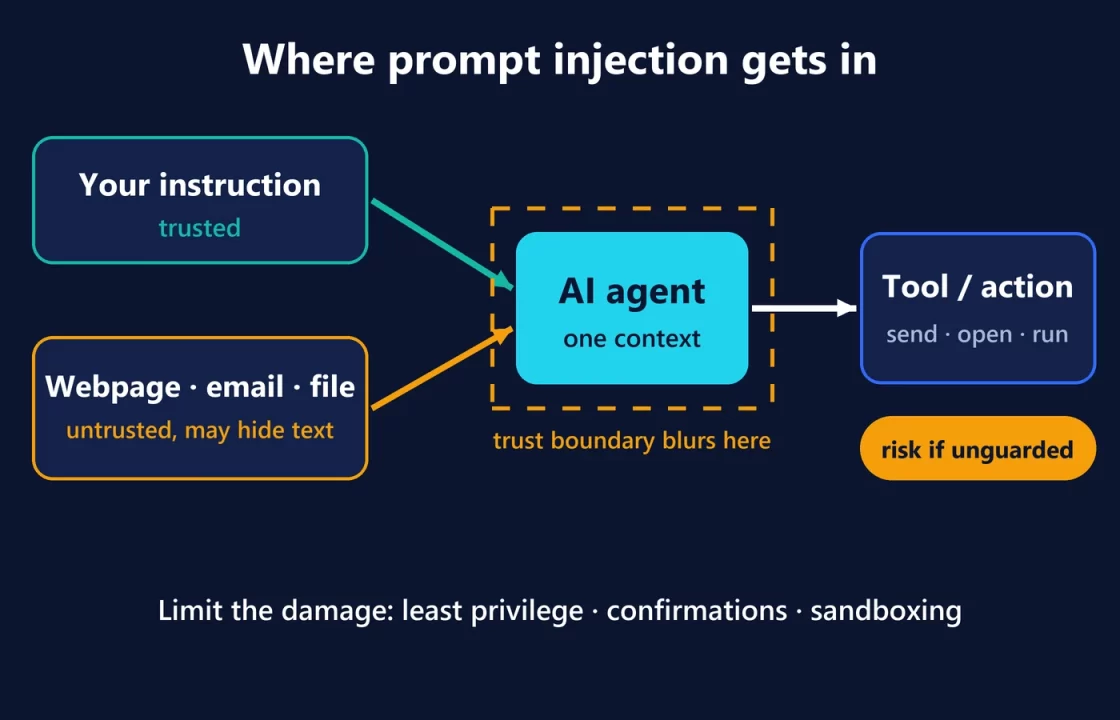
- You ask an AI assistant to summarize a product review page.
- The page contains, besides the review, a passage that people can’t see, styled to be invisible or tucked into a comment. It addresses “the AI assistant reading this page” and asks it to do something you never requested, such as adding a particular link to its summary or sending details from your conversation somewhere.
- The assistant reads everything on the page, because that’s its job. Your instruction and the page’s text end up in the same working context.
- The trust boundary breaks here. If the model treats the page’s text as instructions rather than as material to summarize, it starts working for the page’s author instead of for you.
- What happens next depends entirely on what the agent can do. If it can only write a summary, the worst outcome is a misleading summary. If it can open links, send messages or call tools, the injected request has something to act on.
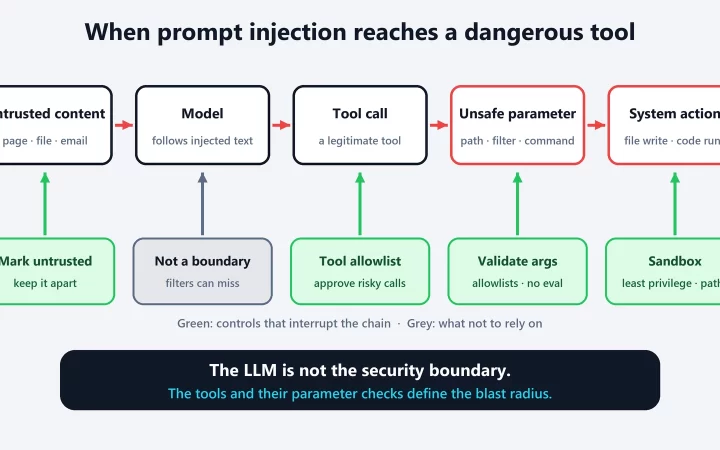
That last step is the useful way to think about it. OpenAI describes it in security-engineering terms: an attacker needs a source, a way to get text in front of the agent, and a sink, “a capability that becomes dangerous in the wrong context.” For agents, that usually means untrusted content combined with “transmitting information to a third party, following a link, or interacting with a tool.”
What an injected agent could be pushed into
The realistic outcomes, as described by OpenAI and OWASP, scale with the agent’s access:
- Bad advice. OpenAI’s example is an apartment search where a listing’s hidden text pushes the AI to recommend it regardless of your criteria.
- Leaking data. This means sending information from the conversation, or from data it can reach, to someone else. OpenAI says this is the attack it sees most often against ChatGPT, and that most attempts fail because the model refuses.
- Unwanted actions. Following links, sending emails, or using connected tools and functions.
- Commands in connected systems. OWASP lists “executing arbitrary commands in connected systems” among the possible outcomes when an agent has that kind of access.
None of this means every agent is unsafe. It means an agent’s risk is roughly the product of what it reads and what it can do.
Why filtering the input isn’t enough
The intuitive fix is a filter that spots malicious text before the model sees it. OpenAI says such “AI firewalling” usually doesn’t catch fully developed attacks, because detecting them “becomes the same very difficult problem as detecting a lie or misinformation, and often without necessary context.” OWASP is similarly cautious: “it is unclear if there are fool-proof methods of prevention for prompt injection.” OpenAI’s November 2025 explainer calls it a frontier security challenge that, like scams on the web, it expects to keep working on.
So the serious defenses don’t assume the model will never be fooled. They limit what a fooled model can do.
The defenses that actually limit damage
- Least privilege. Give the agent only the access the task needs. OWASP recommends restricting the model’s privileges “to the minimum necessary,” and OpenAI suggests using ChatGPT Atlas’s logged-out mode when an agent is only doing research.
- Confirmation before sensitive actions. OpenAI says ChatGPT agent pauses before steps like completing a purchase. Its Safe Url mechanism either shows you information that would be sent to a third party and asks you to confirm, or blocks it.
- Sandboxing and containment. OpenAI sandboxes tools that run code, as in Codex and Canvas, “to prevent the model from making harmful changes that might be the result of a prompt injection.” Operating systems are moving the same way: Microsoft’s new Execution Containers enforce an agent’s file and network boundaries outside the agent’s control. We covered that in what Microsoft’s “hybrid intelligence” means for your PC.
- Separating trusted from untrusted text. OpenAI’s Instruction Hierarchy research trains models to distinguish trusted instructions from untrusted ones, and OWASP advises keeping external content clearly marked and separated.
- Monitoring and testing. OpenAI runs automated monitors and red-teaming, while OWASP recommends regular adversarial testing that treats the model “as an untrusted user.”
OpenAI’s own framing is a useful design test: when connecting a model to real systems, ask “what controls a human agent should have in a similar situation and implementing those.” A support worker who can issue refunds still works within limits, because some customers lie.
What you can do as a user
- Give specific instructions. OpenAI warns that broad requests like “review my emails and take whatever action is needed” make it easier for hidden content to steer the agent.
- Grant less access. Don’t connect accounts or stay logged in when the task doesn’t need it.
- Read confirmations properly. When an agent asks before sending or buying, check what it’s about to share and with whom.
- Watch on sensitive sites. OpenAI’s advice for banking-type sites is to keep the agent in view while it works.
As agents spread into coding tools and operating systems, as with the Codex and ChatGPT Work models we compared this week, prompt injection stops being a curiosity about chatbots. It’s the phishing problem, aimed at software that acts on your behalf.