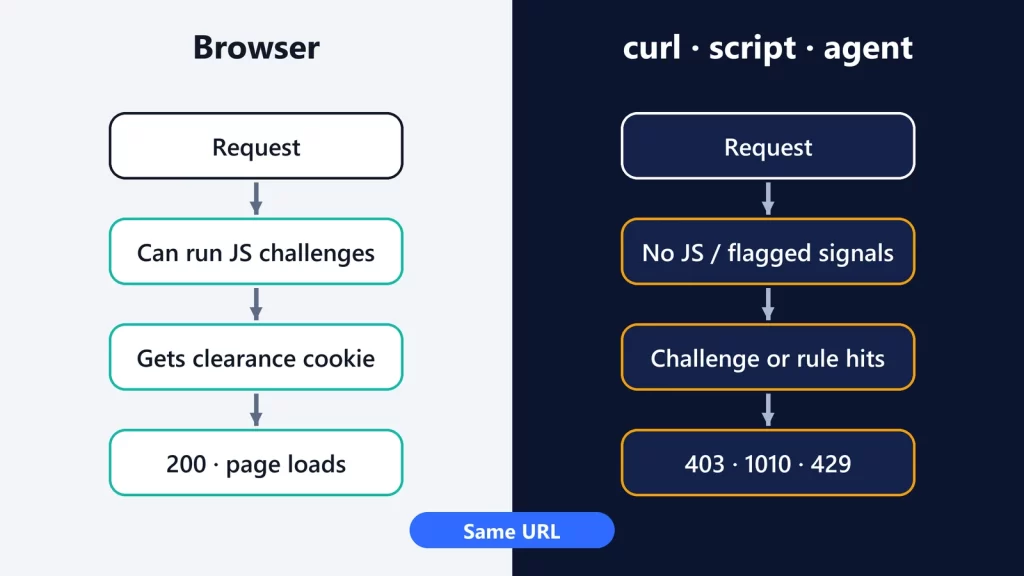
When a page loads in your browser but returns 403 to curl, a Playwright script or an AI agent, the site is usually not “broken.” Its security layer is treating the two requests differently. A real browser can run JavaScript challenges, carry a clearance cookie and present the signals of a normal browser. A script often can’t, or doesn’t. Before trying to change anything, find out which mechanism said no: a challenge, a firewall rule, bot detection, a rate limit or the website itself. Each one has a different legitimate fix.
We’ll use Cloudflare’s documentation as the reference, since it’s one of the most common layers in front of websites. Other providers work on similar principles.
We hit this ourselves
When we connected Solo Tech Pros’ own publishing tools to this site’s WordPress API, a Python client got:
- HTTP 403 with a JSON body naming Cloudflare error 1010, “browser_signature_banned”;
- a
server: cloudflareheader; - meanwhile, normal browsers loaded the site fine.
Cloudflare’s documentation for 1010 says the site owner “blocked your request based on your client’s web browser.” The fix wasn’t changing the client to look like a browser. The site owner added a firewall rule that skips the Browser Integrity Check for the API path the tools use. That’s the pattern this guide follows: diagnose, then fix it where the decision is made.
Step 1: read the response, not just the status code
A 403 from curl can mean several different things. Look at the headers and body (curl -i shows both):
cf-mitigated: challengemeans you got a Challenge Page, not the content. Cloudflare sets this header on every challenge response, and the body is always HTML, even if you requested JSON.- A Cloudflare error number in the body, such as 1010, means a specific rule or feature blocked you. Error 1010 means the client’s browser signature was blocked.
- 429 Too Many Requests is the default response for Cloudflare rate limiting. Site owners can configure any code from 400 to 499 instead, so a rate limit can also look like a 403.
- A 403 with no Cloudflare markers probably comes from the website or its app: missing authentication, permissions, or rules of its own.
Step 2: understand why the browser gets through
Several layers can let a browser through while blocking a script:
- JavaScript challenges. Cloudflare’s challenges run in the browser. Its supported-browsers page lists curl and wget as unsupported because they “lack JavaScript execution capabilities.”
- Clearance cookies. Solving a challenge gives the browser a
cf_clearancecookie, which Cloudflare says is “securely tied to the specific visitor and device it was issued to, preventing reuse across machines.” Copying a cookie into a script isn’t a reliable or appropriate fix. - Browser Integrity Check. It looks for “common HTTP headers abused most commonly by spammers,” and challenges clients without a user agent or with a non-standard one.
- Bot scores. With Bot Management, every request gets a score from 1 (certainly automated) to 99 (certainly human). The score comes from heuristics, machine learning, anomaly detection and JavaScript detections, not from any single header.
- IP reputation and rate limits. Shared VPNs and corporate proxies can carry a poor reputation, and repeated requests can trip a rate-limiting rule.
That’s also why “just add browser headers” rarely solves it, and why it’s the wrong instinct. If a site’s security layer is deliberately blocking automated access, disguising your client to get past it is working against the site owner’s decision. Getting the owner’s permission solves the problem properly.
Step 3: what about Playwright, Selenium and AI agents?
A headless browser runs JavaScript, so it might seem like the answer. Cloudflare says otherwise: browser automation frameworks “such as Selenium, Puppeteer, Playwright, and Cypress, are not supported for solving production challenges.”
For testing your own site, Cloudflare points to Turnstile test keys, meant for automated testing, so your tests don’t depend on solving a live challenge.
AI browsing agents face the same checks, plus a newer question of identity. Cloudflare’s verified bots program covers bots and agents that identify themselves honestly: through a cryptographic Web Bot Auth signature, a published IP list with a stable user agent, or reverse DNS. Since July 1, 2026, it also distinguishes bots run by a single operator from “intermediary” agentic services that many end users can drive. Site owners can then factor that identity into their own rules.
The diagnostic tree
- Does the page work in a normal browser? If not, it’s not a bot problem: check the URL, authentication or the site’s status.
- Does the script’s response carry
cf-mitigated: challenge? If so, it’s a challenge, and scripts aren’t meant to solve challenges. Use an official API, or ask the owner for an exception for your client. - Is there a Cloudflare error number in the body? 1010 means the browser signature was blocked, so the owner can skip Browser Integrity Check for your path. Other numbers point to other features or rules the owner has configured.
- Is it 429, or does it happen only after many requests? That’s rate limiting. Slow down, cache results, use the API’s documented limits, or ask about higher limits.
- No Cloudflare markers at all? Look at the website itself: authentication, permissions or rules of its own.
Legitimate fixes, by who you are
- You own the site: exempt the intended routes instead of weakening security everywhere. Cloudflare’s skip rules exist “when legitimate traffic matches a security rule unintentionally,” for example a trusted API client or an internal monitor. Browser Integrity Check can also be skipped selectively, by path or hostname. Use Turnstile test keys or a staging environment for automated tests.
- You’re integrating with someone else’s site: look for an official API first. If automation is legitimate and there’s no API, contact the owner and ask for an allowlisting or partner arrangement. Cloudflare’s own advice for a 1010 is to “notify the website owner,” because its support “cannot override a customer’s security settings.”
- You run a bot or agent at scale: identify it honestly, for example with Web Bot Auth or published IP ranges, and apply to be a verified bot so site owners can make an informed choice.
The browser and the script are being judged on different evidence. Once you know which check made the call, the right fix is almost always on the side of the person who configured it.
Cloudflare documentation checked on October 9, 2026.