

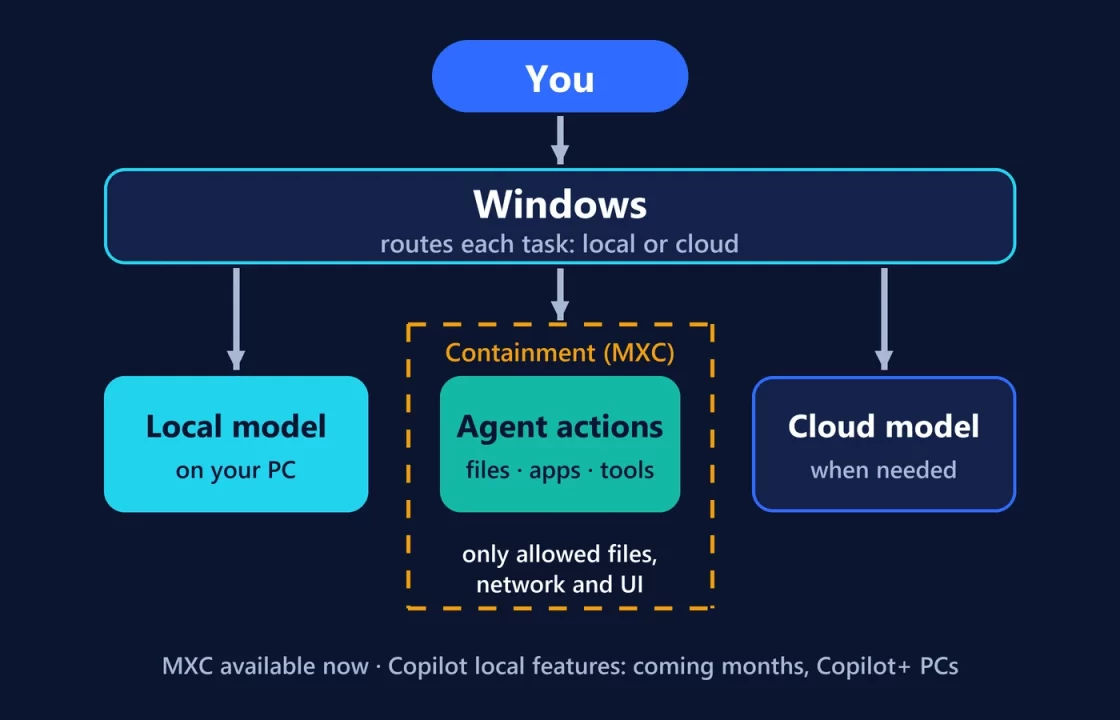
Microsoft’s October 7 “hybrid intelligence” announcement is mostly a roadmap. One piece is real today: Microsoft Execution Containers (MXC) are generally available on Windows 11, giving agents a boundary they can’t widen themselves. The Copilot features that will put local context, local actions and local models on your PC are expected “in the coming months,” and only on Copilot+ PCs. If you don’t run AI agents or develop for Windows, very little changes for you this month.
Here’s what the term actually covers, what runs where, and what to expect first. Status checked on October 8, 2026, against Microsoft’s announcement and its developer post on MXC.
What “hybrid intelligence” means in practice
Strip away the branding and it’s a routing decision: each AI task runs on your PC when that makes sense, and in the cloud when it needs more capability. Microsoft’s stated reasons are cost (“customers’ needs are outpacing what their cloud budgets can support”) and control: containment, identity and management for agents that “can run around the clock, use tools, write code, access files, and act across systems.”
For Copilot, Microsoft splits it into three local capabilities:
- Local context. With your permission, Copilot can use relevant files and recent activity on your PC.
- Local actions. Copilot can act on your behalf in Windows: organizing files, running device diagnostics, troubleshooting, coding.
- Local models. Copilot can use AI models running on your PC for suitable tasks and combine them with cloud models when needed.
All three are announced for Copilot+ PCs and “expected to begin rolling out” over the coming months, with availability that “may vary by device, market, and silicon platform.”
Now, announced, later: the actual status
| Feature | Local or cloud | Status on Oct 8, 2026 | Who gets it | Why it matters |
|---|---|---|---|---|
| Microsoft Execution Containers (MXC) | Enforced on the device (also on Windows 365 Cloud PCs) | Available now on Windows 11 | Agents that integrate it; developers and IT | Limits which files, networks and UI an agent can touch |
| Intune policy for MXC | Managed from the cloud | Announced: “soon” | Organizations | IT can set the boundary, not just the agent’s developer |
| Agent identity via Microsoft Entra / Agent 365 | Managed from the cloud | Announced: “coming soon” | Organizations | Tells agent actions apart from the person’s |
| Copilot local context, actions and models | Local and cloud | Later: “coming months” | Copilot+ PCs only | The first broad consumer change |
| Windows Search actions (“dim my screen”, “mute”) | Local | Insiders now (experimental channel) | Windows Insiders first | Do settings tasks from the taskbar |
| Copilot inside taskbar Search | Cloud | Later: opt-in, select markets “later this year” | Opt-in users | Quick answers without opening Copilot |
| HydraFusion routing to local models | Local and cloud | Later: experimental preview “later in October” | GitHub Copilot app, CLI and VS Code users | Sends some coding work to on-device models |
| llama.cpp support in Windows ML | Local | Announced | Developers | Easier access to open models through Windows’ runtime |
| Large local models on RTX Spark PCs | Local | Pre-order now; Surface Laptop Ultra from Oct 16 | New “builder” PCs | Runs much bigger models on device |
The part that matters most: agents get a boundary they can’t move
Microsoft’s starting point is that “agents don’t work like traditional apps”: they decide what to do as they go, often “without someone watching every step.” That’s why it frames the choice as either giving an agent “the full authority of the signed-in user” or defining a narrower, OS-enforced boundary. Its developer post puts it bluntly: “An agent cannot be its own security authority.”
MXC is Microsoft’s answer. The agent’s developer, and later IT, declares what a workload may use. The policy covers:
- files it may modify, files it may only read, and files it can’t access at all;
- inbound and outbound network access;
- whether it can reach the desktop and UI.
Windows enforces that at runtime. The key line: “The policy remains outside the agent workload’s control, so the agent or generated code cannot grant itself additional access.”
Microsoft’s own example is a coding agent fixing a website. It may read and write the repository and read the production server’s configuration, but if it decides that changing that configuration is the fastest fix, the container blocks the write, “regardless of what the model, generated code, plugin, or tool decides to do.”
There are four containment levels:
- Process container, on Windows 11, macOS and Linux.
- Session container, Windows 11 only. It runs the agent under a separate account with its own desktop, clipboard and input.
- WSL container, for Linux toolchains.
- MicroVM, still experimental.
Policies can run in a learning mode that records what an agent tried to access, which helps developers write least-privilege rules instead of guessing.
Microsoft says Codex, GitHub Copilot, OpenClaw, Replit, LM Studio, OpenShell and Unsloth AI already support MXC, with Claude Code, Perplexity, Raycast and others to follow. On personal PCs, these safeguards come as “part of the agent experience” through the agents that adopt them, delivered via Windows Update and rolling out over time.
The other half, identity, isn’t here yet. Microsoft says Windows will “soon” let Entra separate an agent’s activity from the user’s in Agent 365, so a misbehaving agent can be cut off without locking out the employee.
“Local models” doesn’t mean your current laptop
The local models Microsoft highlights are large. MAI Code 1.1 Flash has 137 billion total parameters (6.8 billion active); Microsoft is shrinking it with 3-bit precision, “nearly 80%” smaller, with a 256K context. Its other examples, a 70B-plus Nemotron model “using just over 20GB of memory” and the 284B-parameter DeepSeek V4 Flash, are described as running on RTX Spark machines like the Surface Laptop Ultra, which has up to 128 GB of unified memory.
Simple arithmetic shows why: 137 billion parameters at 3 bits is roughly 51 GB of weights before any working memory. That’s a different class of machine from a typical 16 GB laptop, where the realistic range is far smaller. We broke that down in what AI you can actually run with 16 GB of RAM. On mainstream PCs, expect “hybrid” to lean heavily on the cloud side for a while.
What changes first, and for whom
- Windows Insiders: Search actions, starting now in the experimental channel.
- Developers using agents: containment arrives as tools adopt MXC, and local routing for GitHub Copilot is due in experimental preview later this month.
- Copilot+ PC owners: local context, actions and models in Copilot over the coming months, with your permission required for local context.
- Businesses: MXC now; Intune and Entra controls “soon”; Microsoft says more at Ignite in November.
- Everyone else: no change yet.
The direction is clear even where the dates aren’t. Microsoft is betting that agents need operating-system-level limits, not just good behavior from the model. That’s a sensible bet. Whether it pays off depends on how many agents adopt MXC, and how strict their default policies turn out to be.